Warning: Undefined array key "mobile" in /var/www/caughtinpixels.com/public_html/wp-content/plugins/post-layout/plugin.php on line 352
Warning: Cannot modify header information - headers already sent by (output started at /var/www/caughtinpixels.com/public_html/wp-content/plugins/post-layout/plugin.php:352) in /var/www/caughtinpixels.com/public_html/wp-includes/feed-rss2.php on line 8 Pont Saint-Martin – Caught In Pixels
https://caughtinpixels.com
A blog by Jacob Surland about making Fine Art PhotographyMon, 22 Dec 2014 08:06:58 +0000en-US
hourly
1 https://wordpress.org/?v=7.1.355217772How to make textures to save a gray photo
https://caughtinpixels.com/how-to-make-textures-to-save-a-gray-photo/
https://caughtinpixels.com/how-to-make-textures-to-save-a-gray-photo/#commentsMon, 22 Dec 2014 08:05:41 +0000https://caughtinpixels.com/?p=1891Read more How to make textures to save a gray photo]]> Once in a while, you just don’t have either the time of day or the weather with you, when you shoot photos. Take this example from Strasbourg. I had researched Strasbourg from home, and had a pretty good idea, what I wanted to shoot. But two things turned out to be a problem. 1) I could not stay in the city until sunset, due to time schedules, but I could stay until an hour before sunset, which could have been good enough. 2) It was grey, and there was drizzle. I shot my shots using an umbrella, and left Strasbourg not quite satisfied with the result. It’s a long exposure, to at least try to make the water interesting enough. I love this place Pont Saint-Martin in Strasbourg. I think it is also probably the most photographed place in Strasbourg, nevertheless I love the place, and I did not want to let my photo go. I looked into alternative processing methods. I did not have any success on the light, so I had to add something else, make it stand out. And as it turned out, it was in using textures I found the answer. This is the before photo: And this is what I did: I shot a number of textures during my summer vacation. I shot more or less anything, rocks, walls, paper, cloth, anything really. And then I processed them a bit in Lightroom. I lowered the contrast to a minimum, removed the biggest ‘pebbles’ using the healing brush, and then I adjusted the white balance to get a nice tone. In Photoshop, I put the textures in layers. I then changed ‘Blend mode’ on the texture layer and chose ‘Overlay’. Most of the options are unusable, but Multiply, Overlay, Softlight and Hard light I often find useful. In this case I used ‘Overlay’ on both texture layers. I then changed the Opacity. Adding a texture, can be “too much” and you can either use the Layer mask to lower the effect, but you can also use the Opacity slider. Using the Layer mask will be more selective, while the Opacity will be ‘global’. In this case I did a global change. I did a few final steps. I cloned out modern antennas, removed few pebbles that I didn’t like, coming from my textures. And finally I corrected the perspective.
]]>https://caughtinpixels.com/how-to-make-textures-to-save-a-gray-photo/feed/61891
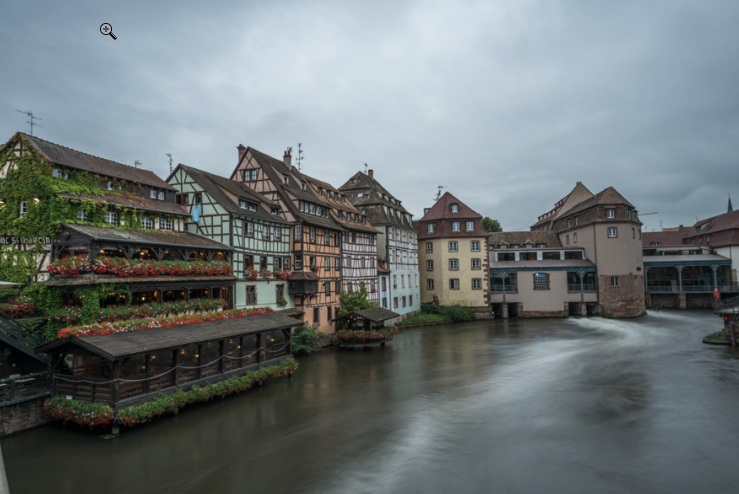
 Once in a while, you just don’t have either the time of day or the weather with you, when you shoot photos. Take this example from Strasbourg. I had researched Strasbourg from home, and had a pretty good idea, what I wanted to shoot. But two things turned out to be a problem. 1) I could not stay in the city until sunset, due to time schedules, but I could stay until an hour before sunset, which could have been good enough. 2) It was grey, and there was drizzle. I shot my shots using an umbrella, and left Strasbourg not quite satisfied with the result. It’s a long exposure, to at least try to make the water interesting enough. I love this place Pont Saint-Martin in Strasbourg. I think it is also probably the most photographed place in Strasbourg, nevertheless I love the place, and I did not want to let my photo go. I looked into alternative processing methods. I did not have any success on the light, so I had to add something else, make it stand out. And as it turned out, it was in using textures I found the answer. This is the before photo:
  And this is what I did:
 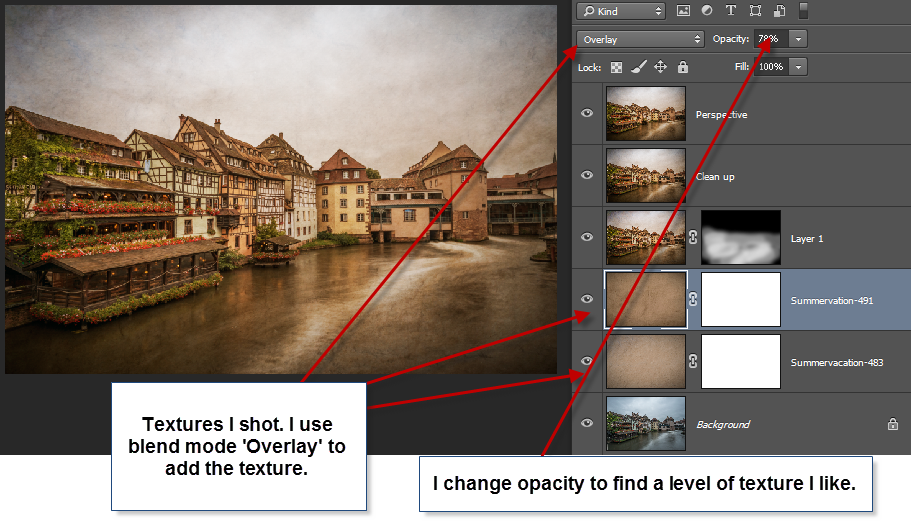 I shot a number of textures during my summer vacation. I shot more or less anything, rocks, walls, paper, cloth, anything really. And then I processed them a bit in Lightroom. I lowered the contrast to a minimum, removed the biggest ‘pebbles’ using the healing brush, and then I adjusted the white balance to get a nice tone. In Photoshop, I put the textures in layers. I then changed ‘Blend mode’ on the texture layer and chose ‘Overlay’. Most of the options are unusable, but Multiply, Overlay, Softlight and Hard light I often find useful. In this case I used ‘Overlay’ on both texture layers. I then changed the Opacity. Adding a texture, can be “too much” and you can either use the Layer mask to lower the effect, but you can also use the Opacity slider. Using the Layer mask will be more selective, while the Opacity will be ‘global’. In this case I did a global change. I did a few final steps. I cloned out modern antennas, removed few pebbles that I didn’t like, coming from my textures. And finally I corrected the perspective.
]]>
I shot a number of textures during my summer vacation. I shot more or less anything, rocks, walls, paper, cloth, anything really. And then I processed them a bit in Lightroom. I lowered the contrast to a minimum, removed the biggest ‘pebbles’ using the healing brush, and then I adjusted the white balance to get a nice tone. In Photoshop, I put the textures in layers. I then changed ‘Blend mode’ on the texture layer and chose ‘Overlay’. Most of the options are unusable, but Multiply, Overlay, Softlight and Hard light I often find useful. In this case I used ‘Overlay’ on both texture layers. I then changed the Opacity. Adding a texture, can be “too much” and you can either use the Layer mask to lower the effect, but you can also use the Opacity slider. Using the Layer mask will be more selective, while the Opacity will be ‘global’. In this case I did a global change. I did a few final steps. I cloned out modern antennas, removed few pebbles that I didn’t like, coming from my textures. And finally I corrected the perspective.
]]>