
The Millenium Bridge and Sct. Pauls Cathedral in London.
The first time I tried to get to the Millenium Bridge, while I was in London, and get a shot of Sct. Pauls Cathedral, I completely underestimated how long time it would take to walk there, from London Tower Bridge. I had to give up, because it was getting very late, and I was tired, and my feet hurt. I had to get a Taxi back to the Hotel because the Underground had stopped for the night.
A few months later, I got back to London, and this time, my starting point was once more London Tower Bridge. However, I did not hang around too long in this neighbourhood, but started moving down the Thames, and when I felt it was time, I got the Underground and quickly got here.
The bridge is actually quite wobbly, and I had to wait until no people walked the bridge, and shot my 9 shots. The dynamic range of this scene is incredibly high, from the darkest areas down around the Thames, and to the highly lit Sct. Pauls Cathedral. But 9 shots did it.
–Jacob Surland
]]>
Sct Pauls Cathedral as close as I have seen it so far. Next time I will go closer!
I always wanted to see Sct Pauls Cathedral up close, and even though I lived in London for a year, it was one of the things, that I just never did get around to do. This time the purpose was to photograph it. As I moved closer and closer, I realized, that it is so huge, that if I got up close, I might not be able to get a proper shot of the cathedral. It was getting late, and I was tired, so I decided that this was as close I got this time. I had begun shooting right after dinner, and I had walked a long way and for a very long time, and I was getting tired. So this time too, I didn’t much closer than this. It’s something I still have on my bucket list…
About the making of this photo
This photo is a seven shot HDR shot ranging from -5 to +1. Why did I use seven shots? Well, one of the hard parts shooting under conditions like this is, that is pretty dark in a street like this, even if there are a few lamps. Sct. Pauls Cathedral itself is white and lit up by a lot of lights, and it is an incredible contrast to the dark street.
The street lamps are bright too. Because I like to have my ‘city by night’ shots well balanced, it requires to capture virtually all light, from the darkest corner to the brightest light bulb. And in this case, I needed shot 7 shots, to cover approximately all light.
When I processed this photo, I suddenly realized that there were stars in the sky. When in a big city like London, the light pollution usually is so bad, that stars are close to impossible to see. I liked having them, and I began to enhance them. Photomatix really can do an excellent job of this, but, unfortunately, digital noise is also increased. In the end, it is a balance of stars and noise levels, and this is my choice. Had I been standing in a field 70 miles from the closest city, it would have been an altogether different story.
]]>

A long exposure photo of the London Tower Bridge just around sunset.
Don’t worry, River Thames was just as muddy as ever. One of the reasons I love post-processing so much is because I can do whatever I like. I am not married to reality, like a documentarist. I am an artist. I process my photos until I get something I like. I don’t particularly like a muddy river, and the blue one looks much better.
But how did I make the water blue?
I made a virtual copy of the image in Lightroom. I now had two identical photos. On one, I started to play with the HSL panel to make the water blue. This made the rest of the image look terrible, but that’s OK, that is why I made a virtual copy.
When I was happy with the water, I selected both images, and exported them to Photoshop as Layers, and then I blended the water into the normal photo, and the result is this image.
]]>
London Tower Bridge and London City Hall shot on a rainy night. See the original image further down.
For some reason, I always find myself much more creative, when I come home with photos shot under difficult conditions. A particular evening like this in London had a light drizzle. Not a lot of rain, but enough to get the ground wet, and the lights reflect a bit. That can turn out pretty awesome.
Almost all photos I shot on this evening, have turned out difficult to process because of the lights. They all have this not too pretty smog orange color, and it’s difficult to get a natural looking image out of it (not that I do natural looking, anyway). And after working with a photo like this for a little while, I get creative. My mind works this way, that it gets creative when solving problems.
This is one the original 7 bracketed shots I used for my HDR image.
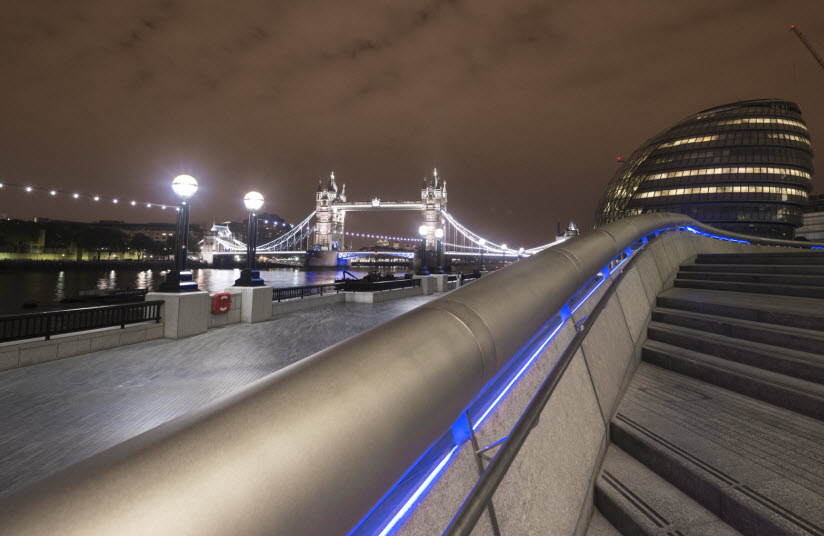
As you can see, I have taken out the orange colors, and I have increased the details in the ground, giving the image a much more dark noir futuristic look.
]]>
“Thames Sunset” shot with a 10 stop ND filter allowing to exposure for 40 seconds with the Sun within the frame.
Using Neutral Density filters can make a dramatic change to your photos. The photo above is a 40-second exposure, which only is possible with something to stop down the light. The Sun is within the frame and had I shot without the filter, the shutter speed would have been 1/25 seconds. I shot this at ISO 100 and f/8. I could have gone to ISO 50 and to F/22, and changed the shutter speed to maybe around a 1/4 or 1/2 seconds, but not 40 seconds.
ND filters are pretty expensive stuff, and I have ended up spending a fortune on them, not only because I have a fairly complete set, but also because I have made some mistakes. Expensive mistakes, that is. In this buying guide, I will try guide you not to make the same mistakes.
There are two kinds of filters, primarily. There are screw-on filters, and there are filters you put in a filter holder. The filter holder is screwed on as well.
I don’t recommend the screw-on ND filters. Though it may seem like a good simple choice at first, it is less flexible. When you have more than one filter, you may start combining filters. A 2 stop plus a 3 stop makes a 5 stop filter. And you might also start using ND gradient filters and soon you might end up wanting to use 2 or three filters at the same time.
- The gradient filters do not come in screw-on for obvious reasons because you can’t place the horizon.
- If you want to combine screw-on filters, you will have to screw them together. I did that with a fairly expensive polarizer filter and a 10-stop filter. And they got stuck together, and I wasn’t able to remove them from each other again. $350 down the drain. I do not screw filter together anymore.
How about flexible filters? There are some brands that make screw-on flexible ND filters. The first ND filter I bought was such one. It went from 1 stop to 8 stops, which sounded just perfect. It was more expensive than one Lee Big Stopper filter, but it was more flexible too. It looked like a good choice.
The only problem with the flexible filter was, that it only worked as supposed for 28+mm and I wanted to use it on wide angle lenses. 28mm isn’t very wide. When used with a shorter focal length the stopping of the light got uneven which made this filter completely unuseful. Another $300 went down the drain.
What do I recommend to buy?
At this point, I had learned my lessons on filters and lost $650, and I went for a no-compromise solution. Lessons are sometimes expensive to learn. I bought a Lee filter holder for 100mm / 4″ filters, and an adapter for my 77mm sized lenses, which fits most lenses I have.
B&H: LEE Filters Foundation Kit (Standard 4×4″, 4×6″ Filter Holder) (Requires Adapter Ring)
B&H: LEE Filters Adapter Ring – 77mm – for Wide Angle Lenses
B&H: Formatt Hitech 100 x 100mm ProStop 1.8 IRND Filter (6 stop filter – explanation for the 1.8 further down in the article). Edit: After a more thorough real-life test of these Format Hitech ProStop IRND filters, I have learned they have a pretty nasty complex colorcast, that I find almost impossible to fix. It depends on the light if the color cast is present, but when it is, it is nasty.
This is a solution just over $300. Still a lot of money, but it’s worth every dime!
And why these? The adapters ring come in a variety of sizes, and you will be able to find one that matches your favorite lens and reuse your 100mm filters without any problem.
There is also a 150mm system, to use on big lenses like the Nikon 14-24mm. At the time of buying my Lee filters, I was still on Canon and only had 77mm sized lenses. When I moved to Nikon to get the 14-24mm lens, I chose to buy the Nikon 16-35mm lens too, to shoot my filtered shots. That was an expensive solution, but the 14-24mm is so great and so wide, and I didn’t want to be without it. That was THE reason for switching to Nikon.
Anyway – I can live without the 150mm system.
The Lee Big Stopper was in back order, and I was told somewhere between 6-12 months delivery (oh God!). So I had to buy what I could get, which was a 2 stop Lee ND filter (and a set of ND soft gradient filters).
While the 2-stop ND filter is nice to have, it is not the one I would choose, should I choose just one filter. 2 stops is just not enough most of the time. If I were only to pick one filter, it would be a 6 stop filter (or Little Stopper as it is also called).
I would choose a 6 stop ND filter if I was only to have one filter
Why this one? First of all, a 6 stop filter has got less color cast than a 10 stop filter. You have to expect some kind of color casts when shooting with ND filters stopping 6+ stops. So the less color cast, the happier we are, and 6 stops have less than 10 stops.
Second, 6 stops are quite a lot. 1/25 becomes 2.6 seconds. Enough to make a change to your photo, but not enough, in a sunset or sunrise situation like the example above shows, but you also have some flexibility from your camera. Let’s look at an example:
The EXIF information for a shot like above without the filter would be ISO 100, 1/25 sec, f/8.
Simply by adjusting the camera, I can change the exposure too. If I change the f-stop from f/8 to f/22 I will change it by 3 stops (see #1 and #2 in the table below), making the exposure time approx 8 seconds. And then I can change the ISO from 100 to 50, which will double the exposure time again, and that makes it around 16 seconds, and that is a good start to get more smooth water. If you do a -2, 0, +2 bracket, chances are, that the water will not be blown out, and you can use that water. And that +2 exposure (#3 in the table below) will be a 64-second exposure. Now we are really getting somewhere!
If I shoot my shots bracketed with a filter attached, I just do it manually, with a cable release. It doesn’t have to be exact to work.
This table shows how to calculate your way around the camera settings. The shutter speed and the f/stop’s are related. Any of these columns represent the same exposure.
| f/stop | Shutter Speeds in Seconds without the filter | ||||||||
| EVS | +4 | +3 | +2 | +1 | 0 | -1 | -2 | -3 | -4 |
| f/1.4 | 1/30 | 1/60 | 1/125 | 1/250 | 1/500 | 1/1000 | 1/2000 | 1/4000 | 1/8000 |
| f/2 | 1/15 | 1/30 | 1/60 | 1/125 | 1/250 | 1/500 | 1/1000 | 1/2000 | 1/4000 |
| f/2.8 | 1/8 | 1/15 | 1/30 | 1/60 | 1/125 | 1/250 | 1/500 | 1/1000 | 1/2000 |
| f/4 | 1/4 | 1/8 | 1/15 | 1/30 | 1/60 | 1/125 | 1/250 | 1/500 | 1/1000 |
| f/5.6 | 1/2 | 1/4 | 1/8 | 1/15 | 1/30 | 1/60 | 1/125 | 1/250 | 1/500 |
| f/8 | 1 | 1/2 | 1/4 | 1/8 | 1/15 | 1/30 (#1) | 1/60 | 1/125 | 1/250 |
| f/11 | 2 | 1 | 1/2 | 1/4 | 1/8 | 1/15 | 1/30 | 1/60 | 1/125 |
| f/16 | 4 | 2 | 1 | 1/2 | 1/4 | 1/8 | 1/15 | 1/30 | 1/60 |
| f/22 | 8 | 4 | 2 | 1 (#3) | 1/2 | 1/4 (#2) | 1/8 | 1/15 | 1/30 |
The highlighted reds are close enough to our example, just without the filter attached.
I would also be able to lower the shutter speed by changing the f-stop in the opposite direction to f/4 and increasing the ISO to, let’s say ISO 400. Then I would have moved the exposure 4 stops faster. I have a span of 8 stops, just by changing settings on the camera.
There are a few compromises. Images tend to be slightly less sharp at f/22 and maybe also at f/4, depending on the lens. Nothing serious, which I can’t get recover in the post-processing.
At ISO 400 there will be a little more noise, but no big problem.
The biggest problem can be the change of Depth of Field by going to f/4.
What brand to choose?
I have Lee Filters for my 100mm system. These are among the very best, and the price comes with them. But you do get what you pay for.
[Edited] My Hitech Formatt IRND filters at first seemed really good, but after a real-life test, I learned that far too often I ended up with a complex colorcast, that I wasn’t able to color correct. I have had a lot of success using the 6-stop Hitech Formatt IRND filter, but the 10 stop Hitech Formatt IRND has a really nasty color cast, that is almost impossible to get rid off. Shot’s I have shot using that, I have turned into Black and White photos, almost without exception.
Instead, I have bought some of the LEE ProGlass and that has even less color cast than the original LEE filters I bought.
I have seen cheap Cokin filters in use, and the photos simply couldn’t be used for anything serious. And putting two filters on top of each other, just made it go from bad to worse.
I can only recommend the most expensive and best filters, simply because the others are not good enough.
Why is 1.8 the same as 6 stops?
In my world only calculating in stops makes sense. That’s how you think as a photographer, but for some reason the filters are primarily given in another scale, having 0.3 pr. stop. A 0.6 filter is then a 2 stop filter, and 1.8 becomes a 6 stop filter.
Another numbering system used is ND64 for the 6 stop filter. This system is easier to understand. That’s the number you have to multiply your exposure time with, and that’s why 1 second (#3 in the table above) becomes 64 seconds in my example above.
Tips for shooting long exposure photos
I have another article on how to use ND filters for shooting long exposures. You can read it here.
]]>
As an Apprentice of The Arcanum we get presented all sorts of tasks and exercises, on our journey to become better artists. At my current level, I have to focus more on what is “me” and “my” art in what I do.
Even before I got the assignment from my Master Robin Griggs Woods, I had started down the road of ‘who am I’? It’s not as easy as you might think, realizing who you are, and what you do, which is uniquely you.
Truth is, that I find myself most creative, when I am sitting in front of Lightroom and Photoshop, not when I am out shooting photos. I get ideas on processing techniques, combining techniques in new ways, trying out all sorts of things. Some photos are fairly straightforward, while others are much more time-consuming, and require that I used my creativity.
Some of my photos, I spend weeks, months, even years before I get the final idea. The images may pop in my head, and then I think of ways to process them for a while. Forget about them, and then come to think about them again. Try some stuff, it might not work, and I shelve the photo again for a while. And then suddenly one day, I have the idea. This photo stars above London is a great example of this process. It took me months and many failed attempts before I finally made something I was happy with.

What I have come to realize is, that I see a difference in ‘just’ processing a photo, into something nice. The other day I processed two nice photos from London, but I didn’t get the kick out of, that I wanted. I thought about it. Why was it, that two perfectly great photos, full of city lights didn’t turn me on? It should be my favorite sort of photos. After thinking about it for a while, I came to the conclusion, that making the photos, only required Craft and Skills, not creativity.
The way I had shot the photos, and the light I had shot them in, didn’t leave much room for processing creatively. And because it was a standard processing technique, I could do in my sleep, it didn’t turn me on.
This fact has changed the way I see myself as a Fine Art photographer. I need room for creativity, in what I do. I get bored by doing the same routine stuff every day.
I have known for quite some time, that I do like to play with the viewers mind. I add elements, enhance elements beyond what is realistic. I may over enhance shadows, add light sources or change colors. This way I can play tricks on the viewers mind. His sub consciousness will detect, that something is not right and some even see what it is. What happens, when I do that, is the image will get an artificial look to it, maybe like a painting or at least border lining to surrealism.
In the photo in the top, of the Japanese Twoer in Tivoli Gardens in Copenhagen, Denmark, I have enhanced the shadows cast by the group of people. The shadows are far stronger than the original photo showed. Another thing I have done is to remove almost all color, in the lower part of the image. There is quite a lot of colored light, and it shows on the ground.
I find these elements very much me, other people may do it too or do similar things, but it is something that I like to do, and that I have found out on my own and integrates into many of my images.
On the London image, I added light beams on top of the London Tower Bridge, even though there are no light beams.
While these small techniques do not dictate a style, they are a part of me and my art. I use them in many different kinds of photos, but they are a part of my images, in general. I have some other techniques, which I also use, to make my own style of photos. It does not necessarily mean that my photos, end up looking the same, because they don’t, but you will find elements in each, that come from the same core.
What I am beginning to realize, is the elements in what I do, that make my photos into ‘my art’, as an expression of me. I like to tease and be surreal, I always loved surreal artists and texts, and, therefore it is a part of the photos that I make.
]]>
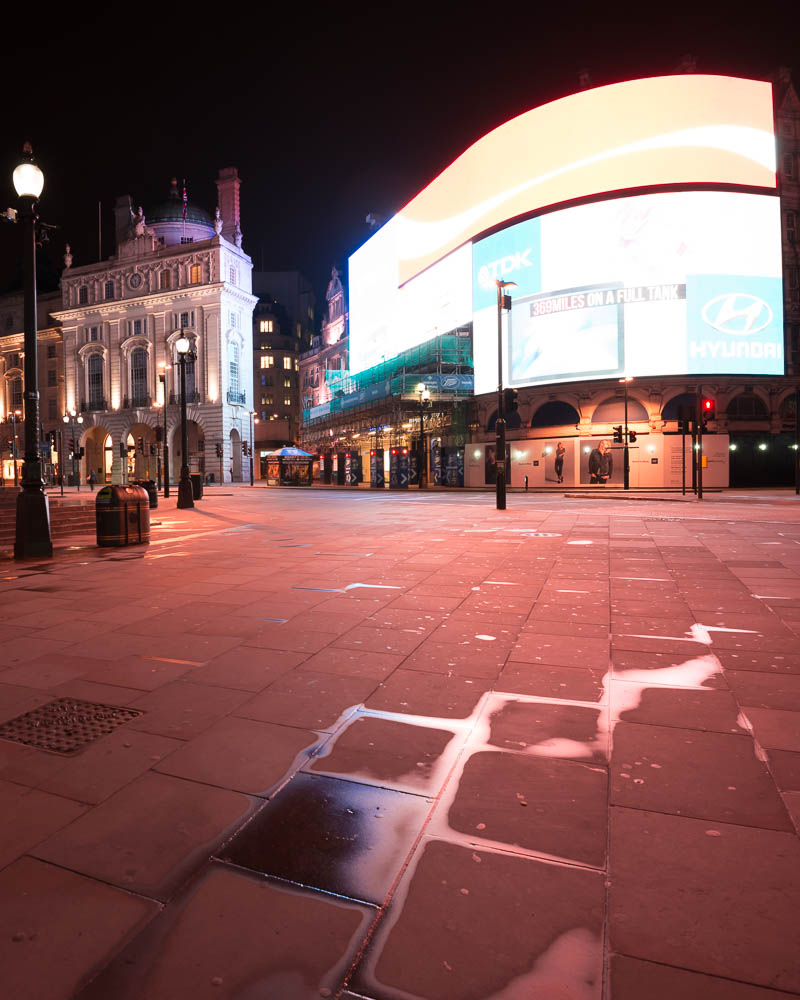
I have a few shots from Piccadilly Circus, and for some reason, all of the chewing gum in the world is spat out here. Have a look at the before photo, and see how much chewing gum there is on the ground. I have spent hours and hours cleaning up the ground using healing and cloning tools in Photoshop.
It’s a drag to clean up that much chewing gum, but it is worth the hard work. The result looks so much better, and it does make the difference.
This is the before photo, or rather one of the 9 photos – actually 18, because I shot two series of 9. The first series were completely empty and the second included the bus.

May the Histograms be with you!
Use the Histograms, Luke!
In this article I will cover histograms. I will use the knowledge from part I and part II of this series of articles on Understand HDR. If you missed the first two, you might want to read them too.
Some of the questions I will try to answer in this article, are ‘What is a histogram?’, ‘Why are histograms important in HDR photography?’ While answering there will be other findings; findings like: ‘Why is it important to push the histogram to the right?’
When I started on digital photography I noticed the histograms on my camera, when I played back my photos on the LCD screen. I did not really realize what, it was. I guessed it was some kind of graphical representation of the photo, which is true, but the real understanding I did not realize until much later.
Last year I attended a photo workshop, and the coach managed in a few hours, to explain to everybody, even the wives of the photo geeks, what a histogram is, how important it is and how to use it in a field. I was quite impressed by this deed.
Histograms are one of the most important tools for a digital photographer. It is always important, also if you are shooting HDR photos, some think it might not be, but it is. I still sometimes forget to check my histograms and I regret it when I get home.
What is a histogram and what does it show?
A histogram is a visual representation of how the tonal range is in a photo. The height of the bars in histogram, tells us how many pixels in the image have the specific tones.
The far left of the histogram is black and the far right is white. If there is a lot of high bars in the left hand side of the histogram, the image will have a lot of dark tones, while if there is a lot of high bars to the right, the image will have a lot of bright tones.
This photo is a well exposed photo:

A photo like this, is a well a exposed photo because the bars does not touch either side of the histogram. But it tells us more than that. From the distribution of the height of the bars, we can see that there is a peak in bright tones end of the histogram, which tells us a lot of brightness exists. And of course that is the bright clouds.
Let’s have a couple of more examples on the histograms. This is an example of a very dark image, in fact it is so dark, that the histogram has a peak at the far left: 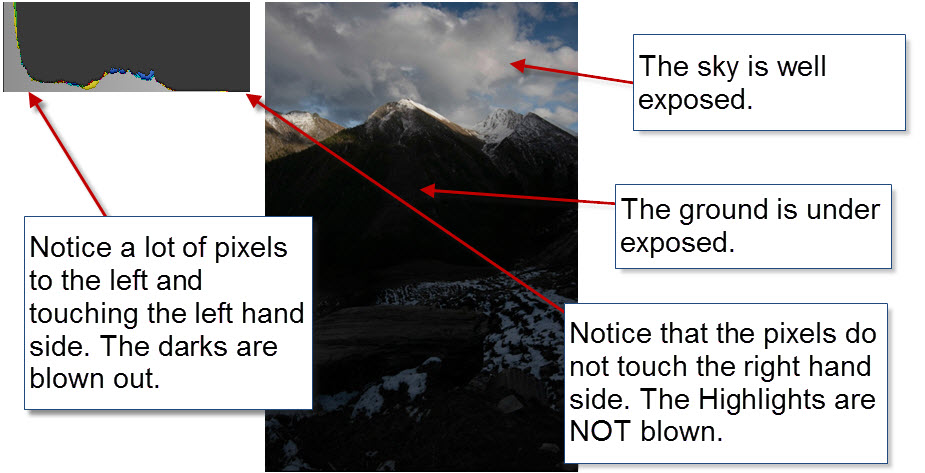 Another example of a very bright photo. Notice how there is a peak at the the right side of the histogram:
Peaks that that start rising at the ends of the histogram, tells us, that completely black (the left side) or completely white (the right side) is present in the photo. Bars that touch either side of the histogram will start clipping away information.
In the examples above, we have black clippings in the first one and white clippings in the second one. You do not want to have clippings in your photos, if you can avoid it! A clipped area has got no details at all, no matter what you do in the post-processing, there is no way that you can recover anything from these areas.
For some reason, the human eye is more forgiving to black clippings than to white clippings (with a few exceptions), so if you have a choice, choose the black clippings, rather than the white clippings.
Some say that a perfect histogram has the shape of a bell curve. But that is not true, it depends very much on the scene. Having information spread across all of the histogram is often a good thing, not evenly spread, just information all of the way. If you avoid having all of the information in one end of the histogram, you are well on the way, in particular the left side (and you will learn why, later in this article).
Dynamic range and Histograms
If you remember the ‘Dynamic Range’ we covered in part II, then this can be mapped into the histogram. In the example below 8 EVS or stops (same thing) is illustrated. A modern camera covers more dynamic range, but for the sake of simplicity I use only 8 stops in the figure.
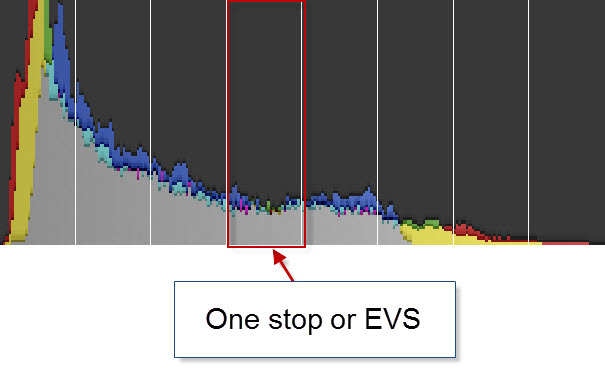
If the scene you are trying to take a photo of, has got a higher dynamic range, than your camera is capable of capturing, you can see it in the histogram. The histogram will have rising bars at each end and you need to find a way to compensate.
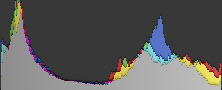
There are a number of ways to compensate. One way is to attach a gradient neutral filter to your lens. This you can use to darken the sky e.g. 2 stops (same as 2 EVS on the sky only). This works fine, if you are shooting landscapes with some sort of horizon.
But what if you are shooting something more complex than that? For instance if you have an object or a person in the foreground of a very bright scene? The object would become a silhouette. To compensate you can use a fill-in flash to put light on the fore ground object. This works nice and you get your histogram just right.
But what if the scene is even more complex than that? If you do not have the object within range for a flash or the scene simply is more complex? Let’s have a look at the night scene from Piccadilly Square in London: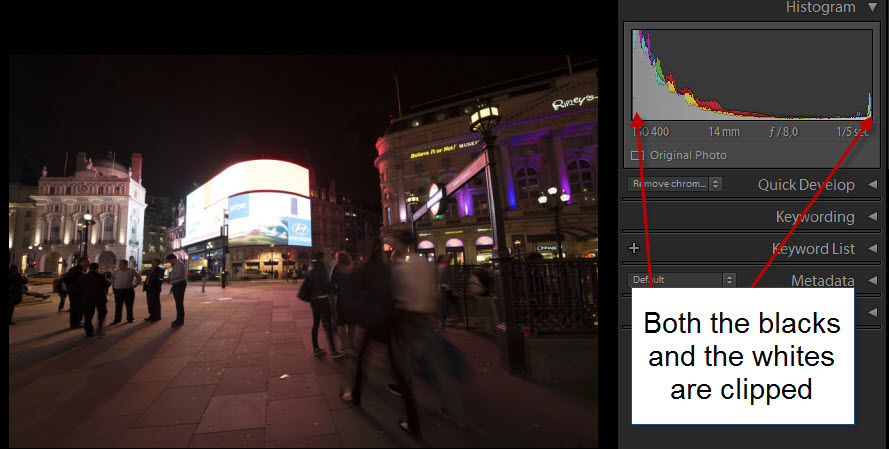 The histogram has rising peaks at both ends, and there are both black and white clippings or as some say, the highlights are blown out. This scene has got a lot of dynamic range and by shooting more shots at different exposures, the tones of the scene can be covered, from the darkest shadow to the Coca Cola commercial.
The only solution for a complex scene like this, is shooting several shots, at different exposures and with different histograms. You have covered the complete dynamic range of the scene, when you have a shot, that does not have any highlight clipping (rising peak at the right).
And the same for the shadows. When you have a shot, that does not have any black clippings. When you are certain you have both, you are done.
What you have to do, when you have shot your exposure bracketed series, it to check if histograms of the darkest and the brightest exposures, and check that there are no rising peaks at the end. If you still have rising peaks, look at the scene, and look for an explanation.
‘Is the Sun within the frame?’, then it is fine. The human eye can not look into the Sun anyway, and it is forgiving for a Sun that is blown out. The same can go for very strong light sources, like street lamps in a dark alley. But if you just didn’t cover enough dynamic range, you should a another series of photos, using a different exposure compensation.
Never trust your LCD screen – trust the histogram!
But why is it important to look at the histogram, why not just the preview using the LCD screen of the camera? Because LCD screens are not good enough to show everything. Of course it will not show you something that is not there (like a blown out cloud. That will be gone forever), but it might lead you into thinking, that you do not have a full coverage yet, and make you shoot more shots.
Use the screen for composition, but check the histograms to check, that you are OK with tonal coverage. The histogram is a very exact representation of your photo.
Push the histogram to the right – Expose To The Right (ETTR)
This is one of the most important techniques to raise the quality of the image and it has to do with, how a sensor works. CCD and CMOS sensors, that you find inside the cameras, are linear devices and they capture light in a number of bits pr pixel. My primary cameras all have 14 bits pr pixels and they all have CMOS sensors.
The first stop gives 16384 (2 to the power of 14 = 14 bits = 16384) tonal levels to capture, the second stop only gets 8192 tonal levels, and as you move down through the stops, the sensor records less and less detailed information.
In other words you get much more tonal information stored in your RAW file, if you push you histogram to the right, when you set the exposure of your photo. Without, of course, blowing the highlights.
These two histograms are a part of the same exposure bracketed series:
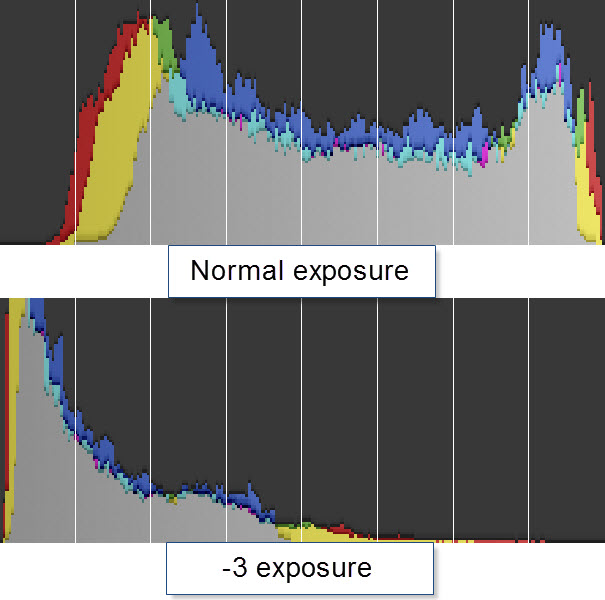
The top on is a normal exposure and the lower one is a -3 exposure. Neither of the two histograms have clippings and in that respect, both are well exposed. This tells us, that this scene was not very high dynamic (yet!). It was just before the Sun came out.
 In Lightroom I can raise the left exposure by three stops, and it will look the same as the right one:

As you can see, they are close to identical, as expected, but… The quality of the two images is not the same. Have a look at this 100% crop (click it to see an enlargement).
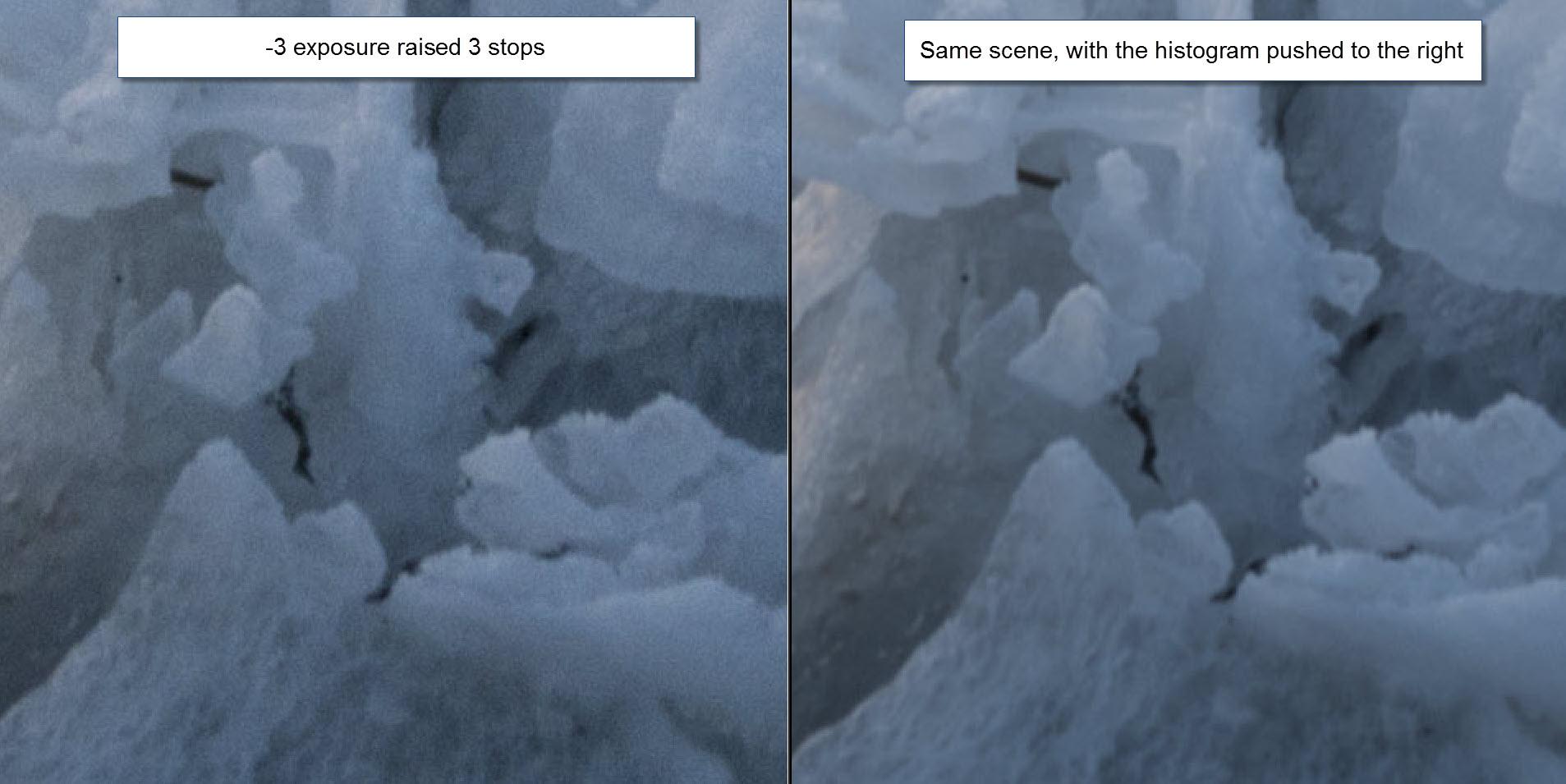
As you can see, there is a lot of noise in left one, the underexposed one. And if you can avoid that situation, you definitely want to do this.
And in this last example, I instead pushed the normal exposure to -3 in Lightroom, and as you can see, they are identical again.

How to use ‘Expose To The Right’ and High Dynamic Range
But how to use this ‘technique’ of exposing to the right together with HDR? The way you have to think of bracketing your shots, is that your histogram is spread across more photos, with different exposures. When you put your bracketed shots into your HDR software, and merge it into a final image, you will get the final histogram.
You can increase your image quality, by making sure, that your shadows, are brought well away from the edge of the left side in the histogram. Avoid having a peak at the fair left in the brightest shot, spread the peak out. Shoot a shot even brighter. The darkest tones doesn’t have to go to the left side of the histogram, just spread it out. This will increase your image quality significantly.
I have made some mistakes in the beginning when I shot my ‘city by night’ shots. The dynamic range can be incredible high in a night shot, as the Piccadilly Square above also shows. The mistake I made in the beginning, was that I was satisfied with the histogram, as soon the left side was clear. But if you still have almost all of your information in the left quarter of the histogram, you simply cannot get as good an image quality, as you can if you push the histogram further to the right.
For that reason, I often shoot from -4 to +4 when I shoot my ‘city by night’ shots. I shoot -4 to get the details of the street lamps and +4 to get the shadows pushed away from the left side.
Next article
The next article is about HDR and Tone mapping. It will build on the foundation we have built up know. Until then, remember:
Use the Histograms, Luke!
Further readings
- Understanding HDR part I – Exposure Value Steps.
- Understanding HDR part II – The Dynamic Range
- Read part IV about HDR and Tone mapping here.
- Get 15% discount on Photomatix Pro. Use promo code: caughtinpixels.
- You might also want to read my free detailed HDR tutorial here.
]]>

I post-processed this 7 shot HDR photo at one of my HDR courses. It’s always interesting to see, what you get from a photo. When I process a photo at a course, I try to find something, that will end up great and has some of the magic HDR look to it. But at the same time involves some problems, like moving people.
The blue hour is a beautiful time. Here you can see the London Tower Bridge in the distance. You see it from alley “More London Place” connecting “The Shard” with the London Tower Bridge.
]]>
What is the hype about the Sony A7R? For the last few months I have seriously been considering buying the Sony A7R camera. Why? Because I love the size of the camera. I find the D800 rather bulky, and sometimes I bring my Finepix X100 instead. The Finepix X100 is a great camera, but it is terrible slow, not wide enough and it is not great for HDR photography.
But having read many many reviews of the camera, to be sure it really is the right choice. To my amusement, I have come across many Canon users doing flip flops over the Dynamic Range of the camera.
Having had owned both Canon 5D Mark III and Nikon D800, I have learned that there are major differences in the two brands, and in particular when it comes to the Dynamic Range. The Nikons are so much better at Dynamic Range, than the Canons cameras. Apparently this is something that many Canon photographers is not really aware of. Canon 5D Mark III (according to www.dxomark.com) has a dynamic range of 11.7 EVS, while the Nikon D800 has got 14.4 EVS. That is 23% more dynamic range coverage. That is a lot! I
have covered this in detail in my comparison review of Canon 5D Mark III, Nikon D600 and Nikon D800.
The switch from Canon to Nikon really is tough. Not only because it is really expensive to switch, because you have bought a lot of lenses. But Canon and Nikon also are rivals and it’s a religious thing, to be either a Canon or a Nikon guy. You do not go to the enemy!
But Sony has hit a sweet spot. They have crammed a similar sensor to that of the Nikon D800E into a very small body, and the camera delivers the quality. And attaching an adapter to the camera, you can use both Nikon and Canon lenses. Nikon only manual focus though.
Of course both Canon and Nikon photographers loves this little camera. But, the Canon photographers really goes “Wooohooohaahaaaay!” and gets a good surprise, when they realize what 14.4 EVS in Dynamic range truly means. The Nikon guys, they are used to this.
Dynamic range explained
What is the Dynamic Range? Well, it is how much light the sensor inside the camera can capture. What is too bright to capture for the sensor, will just be white. And what is too dark will just be black.
The better a sensor is, the more light it can capture. You measure the dynamic range in “exposure value steps”. One step is equivalent of doubling the shutter speed or cutting it in half.
]]>