Holy Atrium – Shoot straight into the air


Warning: Undefined array key "multiauthor" in /var/www/caughtinpixels.com/public_html/wp-content/plugins/post-layout/plugin.php on line 114

Warning: Undefined array key "mobile" in /var/www/caughtinpixels.com/public_html/wp-content/plugins/post-layout/plugin.php on line 352

Look up and enjoy the view, of the attrium at the Hotel Hampton by Hilton in Swinoujscie in Poland. You will get a holy view, if standing in the right possition. Swinoujscie was  a pleasant surprise by the way! Photo by: Jacob Surland, www.caughtinpixels.com
Look up and enjoy the view, of the atrium at the Hotel Hampton by Hilton in Swinoujscie in Poland, and you will get a holy view, if standing in the right position. Swinoujscie was a pleasant surprise by the way – a real beach vacation kind of place. Apparently they have the best beach on the Baltic Sea.

About the photo

It is a single shot. I could have shot a bracketed set for HDR, but the atrium itself, is not that interesting. But the way, the light comes in and forms a cross is interesting. And by having a much contrast, almost silhouetted the cross makes its appearance.

How to plan photo trips?


Warning: Undefined array key "multiauthor" in /var/www/caughtinpixels.com/public_html/wp-content/plugins/post-layout/plugin.php on line 114

Warning: Undefined array key "mobile" in /var/www/caughtinpixels.com/public_html/wp-content/plugins/post-layout/plugin.php on line 352

Churches in Denmark are usually small white churches, but once in while you come by a red one. This one is in Gershoej on Zealand. Photo by: Jacob Surland, www.caughtinpixels.com

One of things I really find myself spending a lot of time doing, is planning where to take photos. Location, location, location. This particular HDR photo I shot some 30 km from my home. And even though I had planned, what I wanted, I ended up with something completely different.

The crop had just been harvested, and hay lay in the fields, either as huge rolls or as long piles of hay. I wanted to shoot some photos of that and I got up real early. Way before sunrise. But I realized, when I stood in the field, that hay really doesn’t do well before sunrise, and the fields I had picked, really wasn’t that interesting for photography. They were Just too flat I think.

I started driving north, more or less along Roskilde fiord, hoping for some better fields. I stopped a few times and tried a few shots, but not really happy with what I got.

And then when I got to Gershøj, I remembered a little harbor and an old Inn. I drove down there a couple of really drunk guys hung around, but they seemed peaceful enough. The harbor and inn was not as picturesque as I remembered them. I did shoot a little, but not really happy, and the sunrise was almost there. I made a quick decision, not to hang around and wait for the sunrise, ran to the car made it for one last chance to get something I liked.

And lucky I was. I had got up on the road, turned right, and then I saw this gorgeous little red church, and the sun just rising above the horizon. I threw in the car and got out.

I drove home happy! Had I not been stubborn, I would not have got anything that morning.

Lessons learned: Even though you have something particular in your mind, it’s not necessarily that you will bring home. And keep your eyes open! You might just, come across something quite wonderful!

My first HDR tutorial class – after throughts


Warning: Undefined array key "multiauthor" in /var/www/caughtinpixels.com/public_html/wp-content/plugins/post-layout/plugin.php on line 114

Warning: Undefined array key "mobile" in /var/www/caughtinpixels.com/public_html/wp-content/plugins/post-layout/plugin.php on line 352

The Queen Victoria Building holds one of the most beautiful Shopping malls I have ever visited. There are 200 hundred small shops, including a Georg Jensen shop, with luxury goods to tempt you. Feel like shopping? If you ever get to Sydney, be sure not to miss this geogeous building. Photo by: Jacob Surland, www.caughtinpixels.com

It’s been a little quiet for a while on my blog. I have been busy preparing an HDR course for a photo club. It was a friend of mine, who asked if I could do a course on HDR in his local photo club, which I agreed to do. It has been really exciting to prepare such a course. I knew that people had very different skill levels, which makes it really hard to make a course. I decided on a beginners level, rather than a more advanced level and had to find out what my primary objectives should be.

Teaching is a good way of honing your skills, because you have to understand what you do more precisely, to be able to explain it. But it also requires the skill to transform what you know to understandable words and examples. Not all has this skill.

Primary objectives when learning HDR

I decided to concentrate on the true basics that form the foundation. These include:

  • How to setup the camera to take bracketing shots.
  • How to merge your photos in Photomatix Pro to get the basic
  • How to improve your photo in Photoshop (or GIMP – the free alternative).

You have to understand how to set up the camera to do the Auto Exposure Bracketing, otherwise it will be hard to do the bracketing. The most important thing is, to remember to use Aperture mode on the camera. If you use Shutter mode, you will end up with exposures with various depth of field, and therefore not identical and unusable for HDR processing.

The HDR software Photomatix Pro is a new tool for most people and luckily it’s not too complex to learn – some of the sliders are difficult to explain what they actually do, but what makes it fairly easy, is that you can just move the sliders back and forth and see what they do. This helps a lot.

What’s important to learn from Photomatix, is to bring contrast into the photo and use the ‘Lightning adjusts’. The naked merged HDR photo is flat and dull. By introducing contrast the photo starts to pop. And the lightning adjustments is a part of the Tone Mapping algorithm, which changes the light in the photo. This can change the mood of your photo quite dramatically, but you have to be careful not to make something really nasty, which certainly is possible. The goal is to make something pretty. What’s ‘pretty’ is subjective and is something you learn over time.

The difficult part is to understand the overall workflow and how to work with layers in Photoshop. What comes out of Photomatix Pro, does not really qualify as a final images. You have to make the last 20%-30% by mixing parts of the original images into the output image from Photomatix. You do that by using Layer Masks in Photoshop: Layers is, if not a strange concept, at least something that you have to learn how to work with and how to master. A number of shortcut keys, ways of working with opacity, pen of different sizes, white and black masks. It’s something you have to learn, but when you master it, you do “get it” you can use the same principles for many things.

I have learned a new way of working with layers. It’s kind of inverted. Instead of working on “white” masks, I have started to work on “black” masks. The huge advantage is that I don’t have to merge layers all of the time and this allows me to backtrack or change what I have done. This I can’t do, if I merge the layers. I will revise my HDR and Blending tutorials for this type of merging soon.

Using this inverted mode of working with Photoshop Layer Masks I find much easier to explain, which is a good thing, as I like to teach.

What would be the next steps

What 2½ hours let you do, is to run through the basics of an HDR work flow, but not really touch the more advanced topics, like double tone mapping etc. This would require more time.

I hope to get to do more of these HDR classes. It’s really something that I both learn a lot from but also find to be great fun!

About the photo

The photo is taken in the Queen Victoria Building in Sydney. A place that my friend who invited me the photo club also visited, just 25 years earlier. Photography takes you to many different paths, in different times, yet places stay the same, more or less.

Updated article on compositional rules


Warning: Undefined array key "multiauthor" in /var/www/caughtinpixels.com/public_html/wp-content/plugins/post-layout/plugin.php on line 114

Warning: Undefined array key "mobile" in /var/www/caughtinpixels.com/public_html/wp-content/plugins/post-layout/plugin.php on line 352

Desolate Central StationCanon 5D Mark III, Canon 17-40mm, ISO 400, 20mm, f/13, 5.0 sec

This is one of my early photos. It’s an HDR photo made of 5 images in Photomatix Pro and afterwards merged in Photoshop.

I have just updated my article on composition. I have updated the photos and added the missing photos and then I have added a 13th rule, which I use a lot when I take my photos these days.

Have a look at it here.


Return from Autumn Workshop in the Queyras


Warning: Undefined array key "multiauthor" in /var/www/caughtinpixels.com/public_html/wp-content/plugins/post-layout/plugin.php on line 114

Warning: Undefined array key "mobile" in /var/www/caughtinpixels.com/public_html/wp-content/plugins/post-layout/plugin.php on line 352

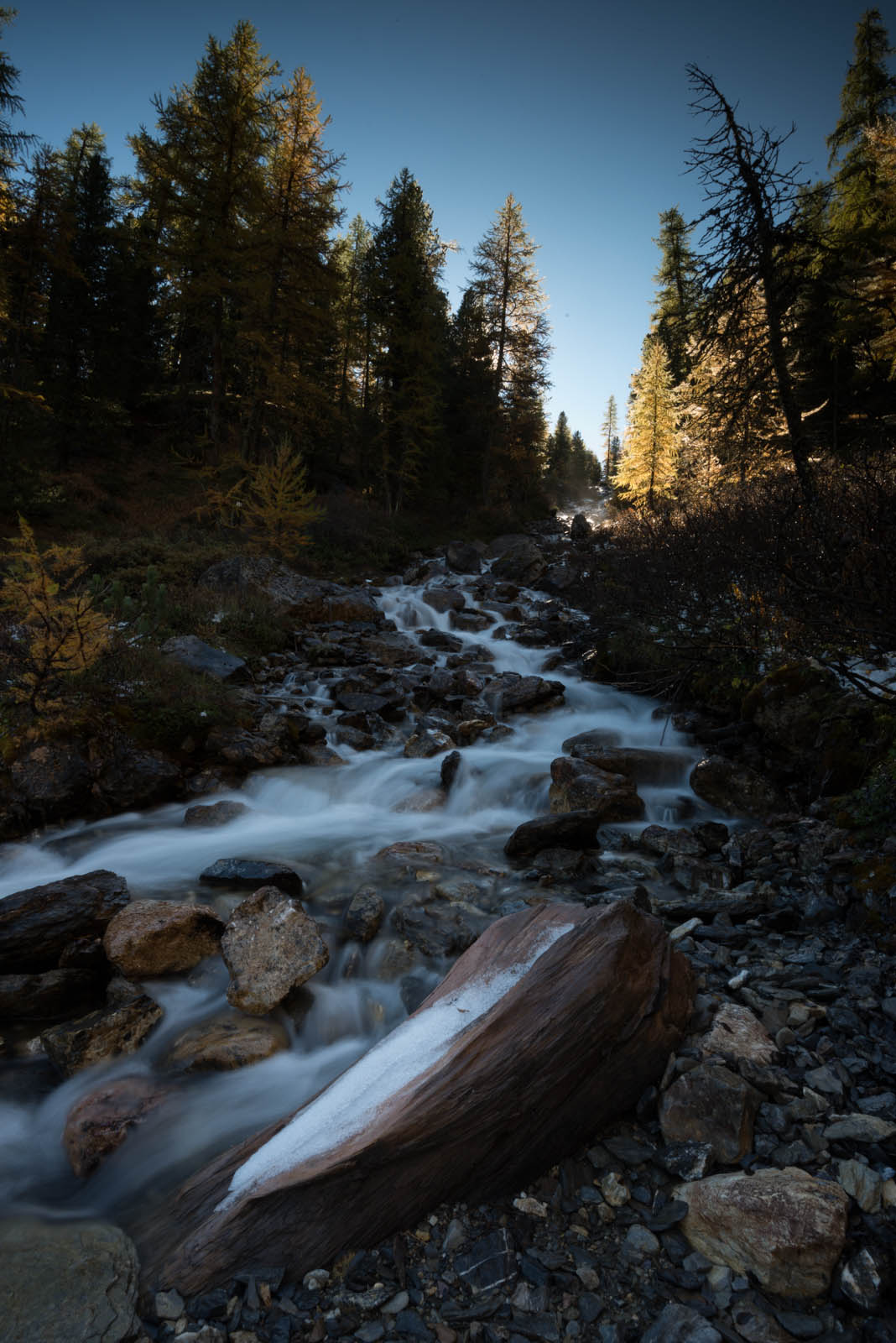
One of the gems in Europe is Queyras in France. A large national park, with outstanding nature and spectacular view points. On the way to Lac Miroir (Lake Mirror)

Nikon D800, Nikkor 16-35mm, ISO 50, 16mm, f/22, 0.8 sec

It’s been an exciting week last week. We had the most fantastic workshop with Duncan Macarthur in the alps in southern France, an area called Queyras that I had never heard about. A true hidden gem in Europe to many people.

Duncan is a fantastic photographer and has got an incredible amount of experience, ranging from wedding photographer, to more cultural photography, to hotel room photography and of course landscape and wild life photography. The latter is where he makes most of his money today.

Not only does Duncan know all of this great stuff, but he also knows how to teach it to others. A skill not everybody has, but within the first day, everybody on the workshop knew exactly what a histogram was, and what the result was if you blew the histogram in either end and more important, why the histogram is important. It was amazing to see the transformation of everybody on a workshop like this. People with very different skill levels attended the workshop, ranging from novice to more experienced, and everybody saw the same scenes with different eyes. Something that everybody learns a lot from.

I of course have brought back a ton of photos, a lot of which are experimenting photos. But I’m quite sure, that there are a some good ones among them and hopefully a few fantastic shots. The photo above was some of what I hoped for. We don’t have streams like that in Denmark and finally I got to photograph one.

We were on a great photo team, with fantastic people (thanks for a great vacation and workshop Anne, Orlando, Frank, Kate and of course Duncan and his lovely wife Fanny). We had a lot of fun and a great time together. It’s fantastic to get to know people in such an intense way around a specific topic that you share the same passion for.

Duncan’s approach to photography is quite different from where I have been moving around for the last year or so, but he is exactly where I initially wanted to be. I finally got the chance really to learn how to use my Lee filter kit and work with the different aspects of landscape photography. How to work with a subject that you have found interesting and keep working on the composition and improving it until you finally nail it.

In the post-processing class I also learned a lot and I believe that I will change the way I work in many ways. The photo above is a single exposure and Duncan will probably think, it’s a bit over the top. Duncan’s approach is to get something that looks absolutely natural, where I often go more artistic ways. I will definitely try to do a few photos with Duncan’s approach and put out my tutorials on the photos that I make. Maybe I will even try to post-process the same photos with a realistic approach and a more artistic approach and see what comes out of it.

The photo above is shot with a 0.6 (2 stop) neutral density gradient Lee filter. The filter darkens the sky, to avoid blowing out the sky and getting an all white sky.

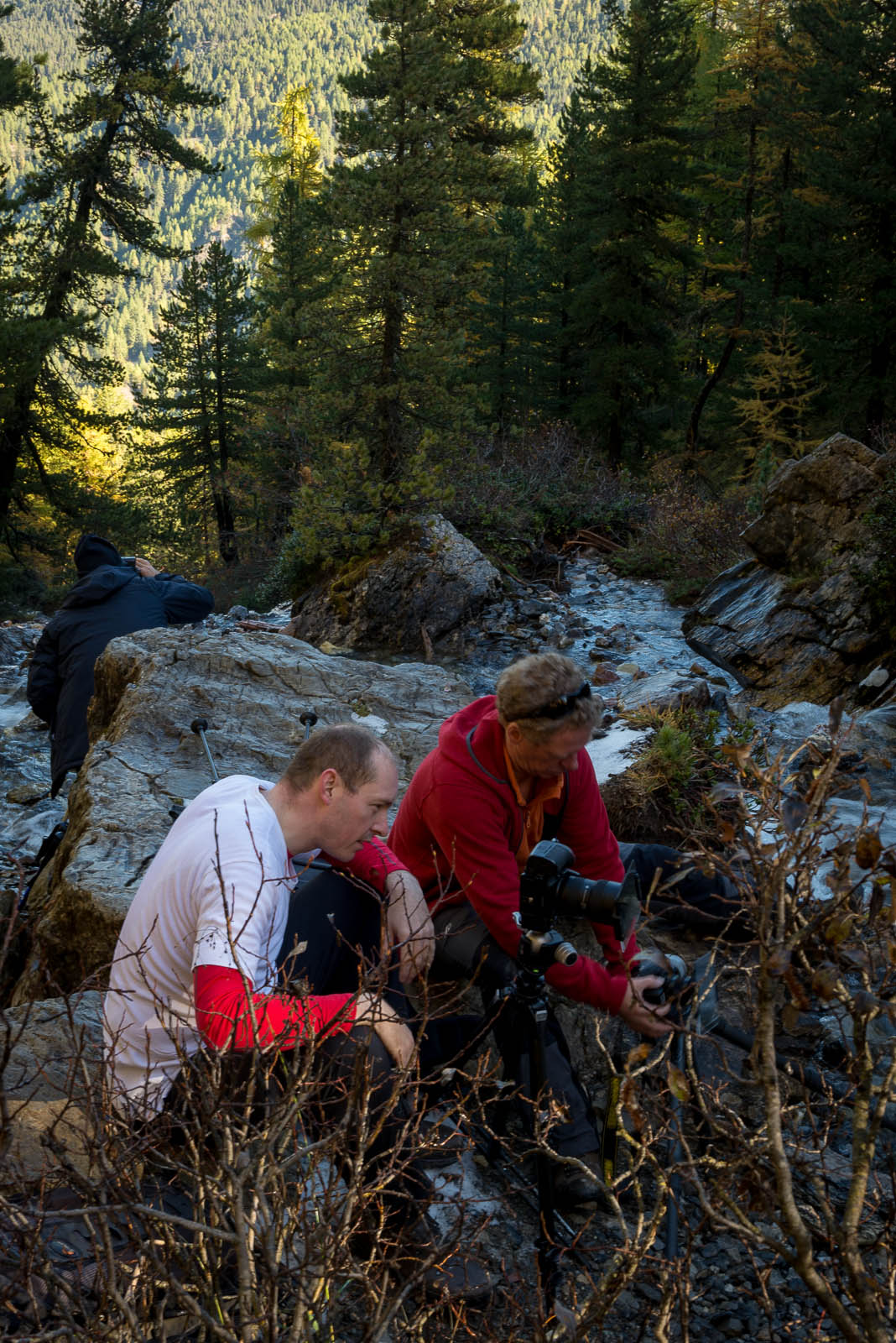
Duncan Macarthur and Jacob Surland taking photographs of a stream

I’m sitting on the left hand side in the white t-shirt and Duncan Macarthur on the right hand side. In the background you can see Orlando.

The post-processing is done in first in Lightroom. First I brought in a little contrast by adjusting Highlights, Shadows, Whites and blacks. As you can see the original looks too flat:

Stream to Lac Miroir - before

The values I used are:

Exposure: +0.36 – The image is slightly too dark.

Hightlights: -50

Shadows: +50

These two even out the shadows and the highlights, and makes it even more flat.

Whites: +31

Blacks: -10

Blacks and white brings the contrast into the photo. Careful not to go to extreme.

In Photoshop I added more light to the water and added more contrast to the stones, to make them pop out of the water. I also corrected the perspective. Later I will post a tutorial on the the Photoshop process, because it’s quite different from what I normally do.

Compared to many of the other photos I have done, this is a fairly light post-processing.

You can also visit Duncans website: www.duncanmacarthur.com.

Scaffolding pest and the blue cock


Warning: Undefined array key "multiauthor" in /var/www/caughtinpixels.com/public_html/wp-content/plugins/post-layout/plugin.php on line 114

Warning: Undefined array key "mobile" in /var/www/caughtinpixels.com/public_html/wp-content/plugins/post-layout/plugin.php on line 352

On Trafalgar Square in London lies the enormous National Gallery. Apparently one of the statues is in for repairing and they replaced it with a huge blue cock. Photo by: Jacob Surland, www.caughtinpixels.com

Do you know the feeling too?
Within the last year, I have started to take photography more seriously. I have started to seek out locations that I like to take photo graphs of. But sometimes I feel that I am suffering some kind of Scaffolding pest or Photographers Plague.

I took a month leave in december 2012 to have a lot of time to work on photographer, both the post-processing as well as time to take photographs. In the one month there were two sunsets that wasn’t overcast. It seems almost impossible. And other things like Mont Saint Michel I travelled far to see, and I ended up seing it on a clear blue sky day, which isn’t good for photography. The four previous days had been totally overcast, which is not any better. And not to make it any better, a large part of was covered in scaffolding and a huge construction site sat in front of the island. Maybe it’s just because I have turned into a photographer I start noticing how many scaffolds and restoration projects are being executed.

I have just returned from a business trip to London and I came past the National Gallery at Trafalgars Square, just as I did last time I was in London. Last time I wasn’t hit by the plague, but this time I was. There is a scaffolding on the building. But notice the blue chicken or cock! Last time there was a big bronze statue of a man on a horse on that pillar, but now a huge blue cock on it… Great with funny solutions!

Learning to criticize your own work


Warning: Undefined array key "multiauthor" in /var/www/caughtinpixels.com/public_html/wp-content/plugins/post-layout/plugin.php on line 114

Warning: Undefined array key "mobile" in /var/www/caughtinpixels.com/public_html/wp-content/plugins/post-layout/plugin.php on line 352

It may be small, but it's a wonderfull small church with the most beautiful view possible. I find it hard to imagine a more beautiful view. The Church of the Good Shepard overlooks the odd blue lake of Lake Tekapo in New Zealand. Photo by: Jacob Surland, www.caughtinpixels.com

It may be small, but it’s a wonderfull small church with the most beautiful view possible. I find it hard to imagine a more beautiful view than this small church has. The Church of the Good Shepard overlooks the odd turquoise blue lake of Lake Tekapo in New Zealand.

The photos is a 3 shot HDR photo post-processed in Photomatix Pro and I then blended layers in Photoshop. To extract the details in the clouds, I used Tonal Contrast in NIK Efex Pro. You can learn to make photos like this too, if you read my HDR tutorial here.

Learn to give critique to your own work

One of the things that I found most important is skill to learn to criticize my own work. Not only for the bad things, also for the good things. What works and what doesn’t work. I have a lot more bad than good photos. Someone said that the first 10.000 photos are bad. I still have too many bad photos, but not as many as I used to. I just deleted 4000 photos that was no good at all and never would be. 6 months ago I probably wouldn’t have been able to decide that.

The process of making a great photo requires that

  • You know your camera and can use it right.
  • You can compose a photo
  • You know when to take a photo – the opportune moment.
  • You can process the photo later in the post-processing software.

Each of these disciplines requires skills and training. People are different and some find composing a photo easier than others do, and others find the technical details of the camera super easy, while others don’t. You always have some strengths and weaknesses and your weaknesses you have to work harder to get good at.

A fifth bullet is the

  • You have to learn to criticize your own work.

This is far more difficult than it sounds. Start by looking at photos you see posted around the web on Flickr, Google+ or even Facebook. You will find some you like, but a lot more you don’t like. Why is it that you don’t like them? What’s wrong with them? Is it taste or is just not great photos? Try to figure out what problem you have with the photos – and then avoid doing it yourself.

Personally I like colors a lot and for that reason I rarely make black and white photos and I don’t spend much time looking at them either, though I respect black and white photographers. I really love the richly saturated photos and therefore I make richly saturated photos. Some would probably say over saturated, but that’s really up to me to decide.

Learning to criticize your own work is about learning what you like and what you don’t like and learn to scrutinize your photos for the presence or absence of either one. Sometimes I can process a photo and publish it instantly because I like it so much. Later, perhaps even within the hour of publishing it, I start to see errors or problems in the photo and I regret that I published it. Big mistakes I will have to fix and replace in my Smugmug portfolio, but I can’t do that with the photos I posted in Google+ or Flickr. This will have the errors forever.

There are probably many ways of learning how to give critique to your own photos. I will tell how I do it.

I usually let my photos lie around for some time, before publishing them. Currently I have 35 unpublished and completely ready and meta tagged photos. I then have around 30 more which are some that I think has got the potential and I’m in progress with – either as post-processing or just evaluating. And then I have a back log of 15.000 photos or so that I have taken over the last 12-15 months. Some of those photos are crap, while others have potential. Some have great potential, but I still just haven’t got around to select them.

The 35 ready-to-publish photos I will look at in turn regularly and in some of them I find things I don’t like about them as time passes by. Sometimes I start to dislike a photo, because a photo has a major flaw. Sometimes I can’t pin point the flaw for a while, until I suddenly realize it. It’s about finding what the weakest point of your photo is. And remember:

A photo isn’t stronger that it’s weakest point.

Sometimes it can be very hard to spot what makes a photo weak. Is it something about the technical quality like lack of sharpness, or is it the composition, maybe something about the light or is it the post-processing? If it’s one the three first, it can be very difficult to fix and you will probably have to discard the photo and if at all possible re-shoot it at a later time (I have a Collection in my Lightroom called Re-shoot, for photos I know I will get a second chance to shoot). But sometimes I might find a way to solve the problem. Like I did in this photo:

The problem with this photo (from Sydney Australia) was that I had taken it very quickly and had not made sure to get everything sharp. The wooden pillars wasn’t sharp close to the edges. After a while I got the idea of making this radial blur on the photo and blending it with the sharp part of the photo and then get this moving effect. That works and it saved my photo. But many times I have given up. Like I did on this photo below (it’s one of the photos I have been spending most time on, without any result):

New Zealand - Arthurs Pass

I do like the composition on this one, but for some reason it keeps not ending up where I want it. First of all I have shot it with my 28-300mm Nikon lens, which really has some sharpness issues. So the quality of the photo is not as good as I would like it to be – it’s not sharp enough. Second – the light is not very great. I have tried all sorts of things to compensate for that. I have used a number of more advanced filters, but nothing really works. The conclusion I have made is that while the composition works fine, the light fails and there fore the whole photo fails. I would love to go back and re-shoot, but I’m not sure if that is ever going to happen.

If it’s “only” the post-processing that has problems I will try to process it again. Sometimes it’s because a photo is difficult to process and then I just have to wait (or re-process later) until I have the skills. These photos stay in a ‘work in progress’ collection in my Lightroom.

By letting the photos sit around I slowly but surely figure out what I like and don’t like about my photos. I learn how to criticize my own work and my loop hole for acceptable photos keeps shrinking everyday on different parameters. Sometimes I like a specific photo for one thing, while another part fails and I have a hard time discarding the photo. But I’m getting better at discarding.

A great side effect of this process is, that I get better I get at shooting the photos. One of the most important lessons I have learned is about the light. Light is everything. If the light is not present, forget about taking photos! At least the kind of photos that I like to take. I have learned that it is much better to take 500 photos around sunrise or sunset than at noon, because the light is much better. And the photo above from Arthurs Pass in New Zealand is a great example of this. This makes me relax during the middle of the day and not keenly look for a photo opportunities everywhere.

How to use advanced Dodging and Burning to improve your photo


Warning: Undefined array key "multiauthor" in /var/www/caughtinpixels.com/public_html/wp-content/plugins/post-layout/plugin.php on line 114

Warning: Undefined array key "mobile" in /var/www/caughtinpixels.com/public_html/wp-content/plugins/post-layout/plugin.php on line 352

At daytime Mont Saint Michel is crowded with tourists, but later, when the sun is down people leave the place. It's a labyrinth of small streets and alleys criss crossing their way to the entrance of the monastery on the top of the mountain. Small lamps light up and make it very Harry Potter medieval town. Photo by: Jacob Surland, www.caughtinpixels.com

Buy a print

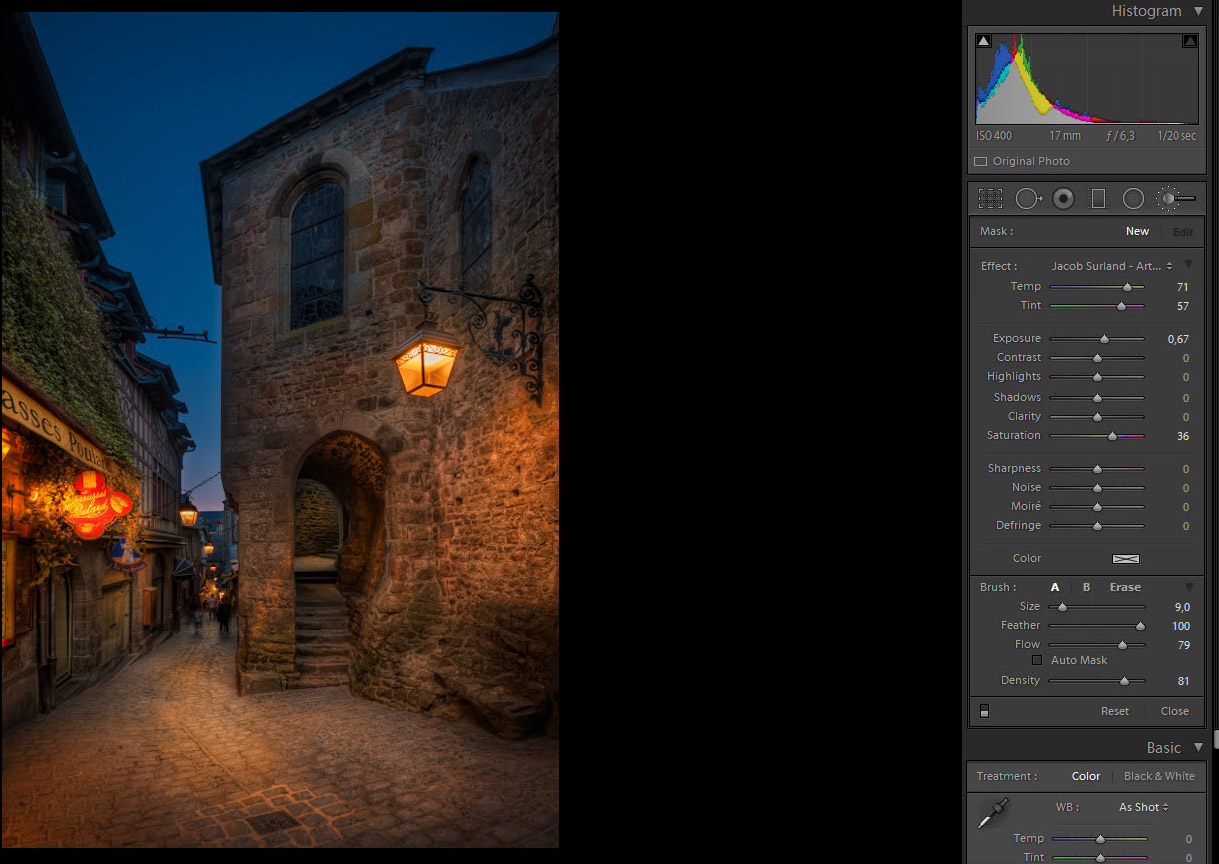
Only recently I realized how powerful a tool and technique dodging and burning really is. I always thought of classic dodging and burning, but modern digital dodging and burning is much much more powerful and I have started to use it in some quite cool ways and I will show you how you can use this to improve the mood of your photo. I have written a tutorial on dodging and burning here.

In the article I have shown two different techniques used in the photo above, try and hover the mouse to see the changes I did with the Brush Adjustment tool::

Mont-Saint-Michel-Light-up-Adjustment-Brush

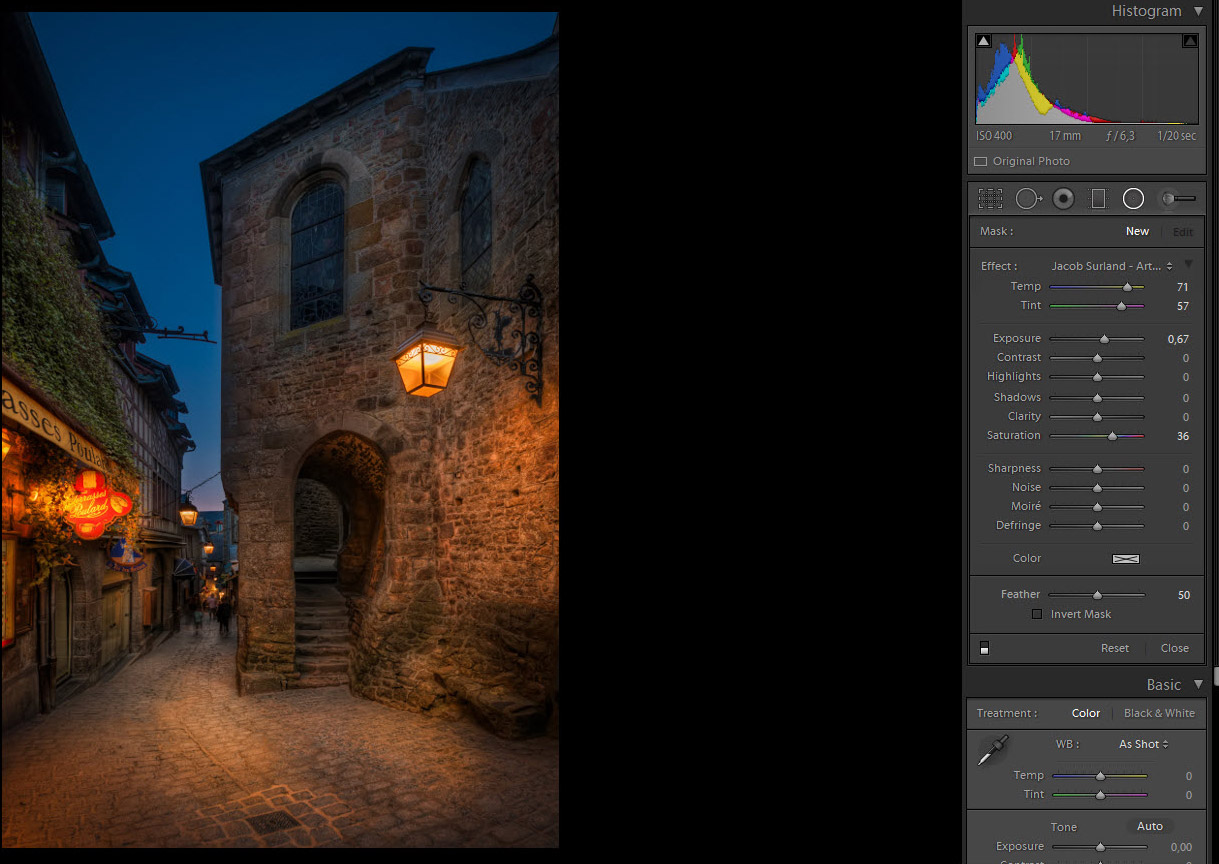
And then hover to see what I did with the Radial Filter:

Mont-Saint-Michel-Light-up-Radial-Light-Up

Notice how I have lit up the passage up the stairs and the platform at the far end of the passage and added light in the street. This makes the viewer curious and it seems welcoming and I achieved the warm and welcoming image I wanted.

Further examples and readings

Read the detailed tutorial on dodging and burning here.

I have been using Dodging and Burning many times and these are just two examples:

A Moeraki Boulder

Here I burned the shadow of the rock to emphasize it.

and in the next one I dodged the snow, to make it look like the light is shining from the viking ship.

Viking ship lit in the Winter

Do you want to make photos like these too?

All three of these images are made like HDR – which is an advanced photo technique, that you can learn too. If you want to make images like this, I can recommend to read my completely free and very detailed HDR tutorial and that you get your hand on a copy of Photomatix Pro. I can offer you 15% discount by using the coupon code “caughtinpixels”.

How to make double tone mapped HDR photos


Warning: Undefined array key "multiauthor" in /var/www/caughtinpixels.com/public_html/wp-content/plugins/post-layout/plugin.php on line 114

Warning: Undefined array key "mobile" in /var/www/caughtinpixels.com/public_html/wp-content/plugins/post-layout/plugin.php on line 352

Bean at Night The Bean in Chicago is an awesome pieace of art. Though I only had very little time in Chicago I managed to get by it three times, the last time was at night time. The bean is a huge mirror built in steel, and then shaped like a bean. Everything reflects in the bean but in strange ways, because of the curves. It's very fascinating.

Buy a print

The Bean in Chicago is an awesome pieace of art. Though I only had very little time in Chicago I managed to get by it three times, the last time was at night time. The bean is a huge mirror built in steel, and then shaped like a bean. Everything reflects in the bean but in strange ways, because of the curves. It’s very fascinating.

The photo is a 5 shot HDR shot with my Nikon D800 and the Nikon 14-24mm lens, which I love to death. When I processed this photo I made both a tone mapped version and a double tone mapped  image in Photomatix Pro and then I have blended them in Photoshop. The double tone mapped image I have primarily used for the ground, because it emphasize the texture and details.

Double tone mapped HDR images are often very easy to recognize. They push the image beyond a natural looking image, into a much more painterly world. They start to look like paintings rather than photos. Some like this, others don’t. I do like it. But exactly what effect you get when you double tone map an image, depend very much on how the light was when you shot your photo. A city night shot like this of the been, is excellent for double tone mapping. Here are some other examples of double tone mapped images:

The Royal Stables

The spider at the gates of the old Citadel

University of Copenhagen

As you can see they have a look and feel in common. That is the because of the double tone mapped image made in Photomatix Pro.

What a double tone mapped image does, is to exaggerate the texture and details enormously, which can look very cool if applied to all of an image, but you can also use it much more subtle, like in the two images below. In both I have applied a double tone mapped image to both on the rocks in the foreground and to the house in back ground, but the rest of the images are mostly other normal tone mapped or maybe just even one of the original shots.

Church of the Good Shephard

The old hammer mill

As you can see, they are very rich in detail on the rocks as well as on the houses. This is because of the double tone mapped.

How to make a double tone mapped image

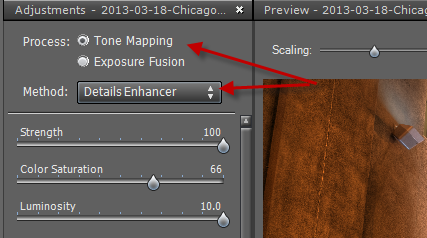
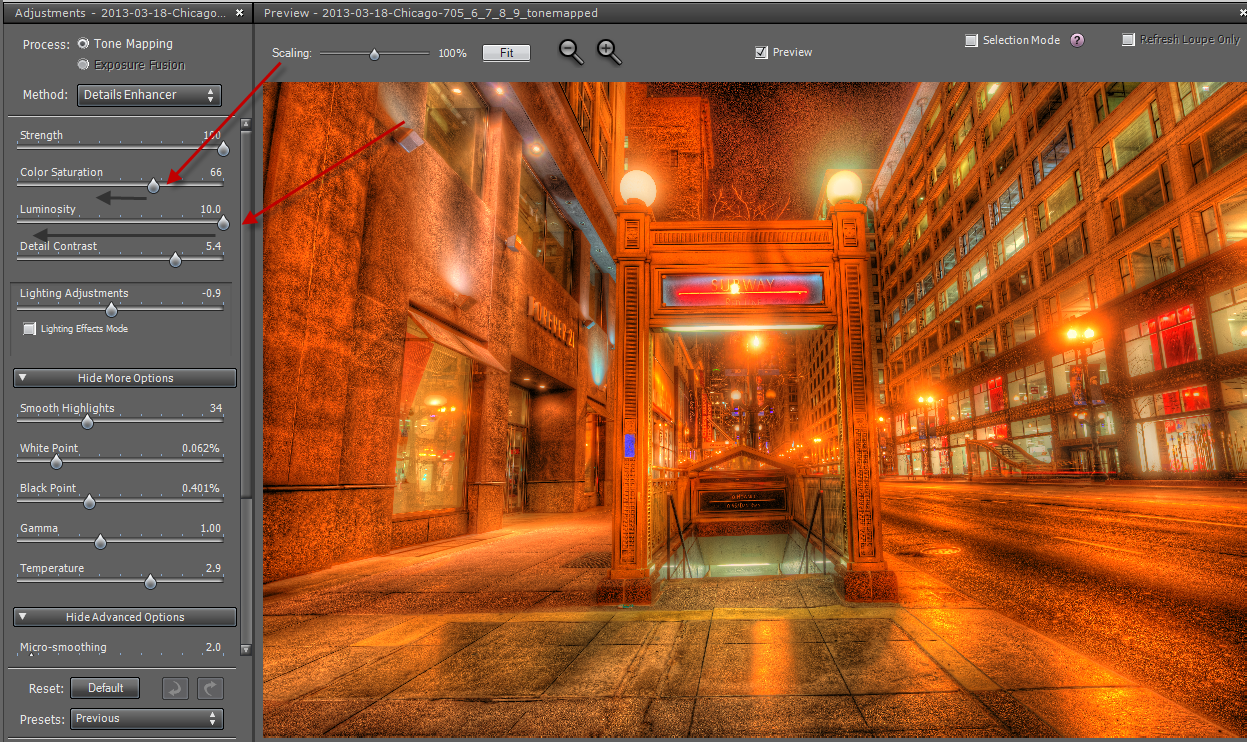
The idea of the double tone mapping is that, you first do one HDR photo and tone map it in Photomatix using the option “Tone map” and “details enhancer”:

Step 1 Single tone mapping

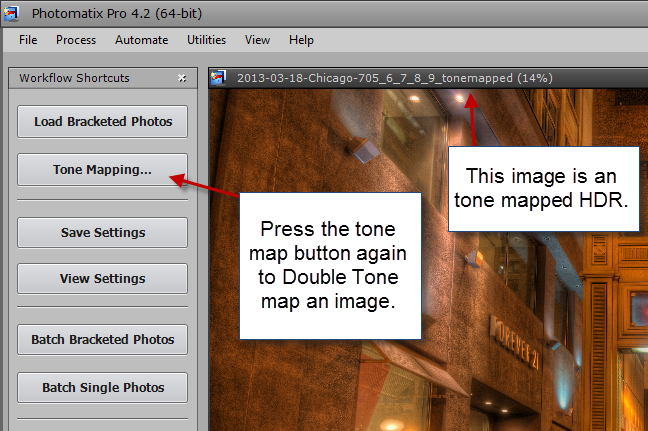
and the image that you get from that process, you tone map too.

Step 2 Double tone mapping

This is simply done by pressing the “Tone mapping” button once more. A side effect of the double tone mapping is, that you get a lot more noise (grain) into the image and a wildly saturated image. The noise you have to clean up with a tool, but not necessarily all of it. The noise adds some of the grittyness to the image, which is part of the effect.

Step 3 double tone mapping

As you can see this is wildly saturated, so I slide the saturation slider to the left. I also do that to the luminosity slider. The Luminosity slider is very potent now, and I select something that I like, which is usually on the far left. And this is the result I get:

Step 4 double tone mapping

When you try to do this, try some of the other sliders too, and see how they affect your photo. When you are done, you have your double tone mapped image.

The way I process my photos, I will only use a portion of the photo. I never use what I get from Photomatix 100%, I always mix a bunch of images into the final image. I have a pool of candidates, the double tone mapped image is just one candidate.

If the double tone mapped effect is too strong, I will only mix it in with perhaps 50 or 75% opacity (see my tutorial on blending and mixing layers in GIMP or Photoshop).

This is the basics of double tone mapped image. You do need to have Photomatix Pro to do that. If you use this coupon code “caughtinpixels” you get 15% discount, and you can Photomatix Pro here.

Understanding crop factor, wide angled lenses and tele lenses


Warning: Undefined array key "multiauthor" in /var/www/caughtinpixels.com/public_html/wp-content/plugins/post-layout/plugin.php on line 114

Warning: Undefined array key "mobile" in /var/www/caughtinpixels.com/public_html/wp-content/plugins/post-layout/plugin.php on line 352

Not so hidden passage When I shot this photo I was worried about the bum walking in the far end of the passage, but because I used a wide angled lens, he got pushed so far away, that he grew so small that it didn't matter. It is a shot from the back side of the National Museum in Denmark.
Not so hidden passage

When I shot this photo I was worried about the bum walking in the far end of the passage, but because I used a wide angled lens, he got pushed so far away, that he grew so small that it didn’t matter. But when I shot this shot, I didn’t really understand what was going on and because I have spend quite some time thinking about it, I will share my thoughts on the topic.

When I bought my first DSLR back in 2007, a Canon 400D, I was told that I had to multiply my mm on the lens by 1.6. And because I had a 300 mm lens, that was equivalent of 480mm. I found this odd, but that was cool because I had a 70-300mm, which was really a 112-480mm. The crop factor made it an  even more extreme tele zoom lens. That was cool. I learned too that there are different crop factors, e.g. Nikon has a crop factor of  only 1.5, so I thought Canon was just a notch better than Nikon at this crop factor thing. Later I found out, that this was one big misunderstanding.

To fully understand this I have to explain several things, I will:

  • Explain the difference between a camera with an APS-C sensor and a camera with a full frame sensor.
  • Then I will explain how conversions between the APS-C sensor and full frame sensor work.
  • I will also explain how wide angle and tele lenses work and what lens compression is.
  • And last I will explain a bit about what effect this while crop factor thing has on bokeh (out of focus back ground).

It’s actually less than a year ago I figured out how it really works and that it is a big mistake, to think of it as ‘equivalent’. It was after I bought my Canon 5D Mark III and a bunch of lenses, that I learned how it really works (you might also like to read my Review of Canon 5D Mark III vs Nikon D800 and Nikon D600).

A cropped sensor (APS-C sensor) vs a full frame sensor

Inside a digital camera, there is a sensor that captures the light that comes through the lens and translates that into an image. Sensors in DSLRs most commonly comes roughly in two different sizes, the APS-C sensor and the full frame sensor. The smaller APS-C sensor is approx 23mm x 15mm, while the larger full frame sensor is about 36mm x 24mm. The exact size varies from brand to brand. The full frame sensor corresponds to the old 35mm films.
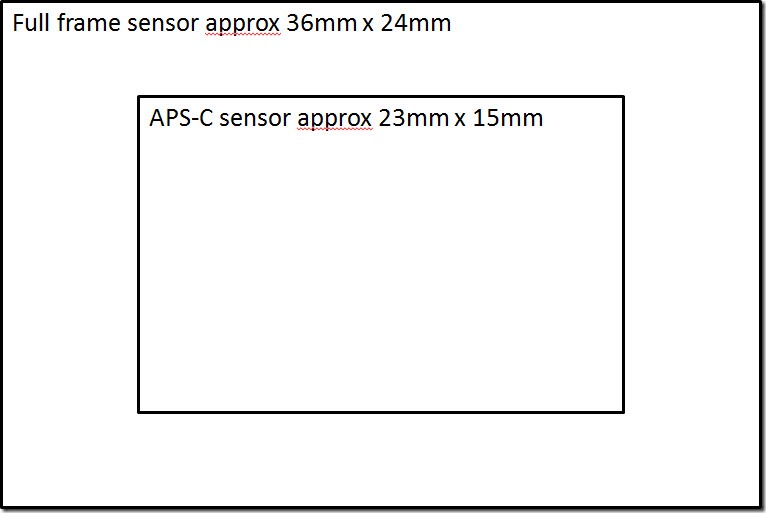
Size of Full frame vs Cropped sensor

When you attach a lens to a camera, a lens does not change how it works, whether it is attached to a full frame camera or an APS-C camera. A 15mm lens is defined from the way the glass is constructed and placed in the lens. By moving it to from one camera type to the other, does not change the lens or the glass.

The difference lies in what is captured by the sensor and because the APS-C sensor is smaller, it also captures a smaller portion of the scene that comes through the lens, while a full frame sensor captures a larger portion of what comes through the lens. And this is very important to understand! If you didn’t quite understand it, I encourage you to try to read it again.

If I shoot a scene with a 15mm lens on a full frame camera body and I then move the lens to an APS-C camera body and shoot the scene again, I will get a smaller portion of the scenery with the APS-C sensor. If I cropped the image I shot with the full frame camera in Lightroom or Photoshop in the post-process, I would get exactly the same image from the two cameras (probably in different mega pixels, but otherwise the same image).

If I want to capture the same scene on the APS-C camera, I would have to compensate, for what the sensor crops away. There are two ways of compensating, one is to move further away and the other is use a wider lens, which captures more of the scenery. Let’s stick with the wider lens.

Now the crop factor comes into play. It is calculated like this using the width of the sensor 36mm / 23mm = approx 1.5. And remember the exact numbers vary from brand to brand.

So if I used a 10mm lens on an APS-C sensor, that would compensate from what the sensor crops away, because 10mm x 1.5 = 15mm. The is the reason for the confusion of the lenses being ‘equivalent’. But let’s not forget, that it is not longer the same glass in the lenses. On my full frame camera I have a 15mm lens and I have a 10mm lens on my APS-C camera and they do produce different images, as you will be able to see further down in this article.

And these two lenses behave different because of lens compression, which brings me to the other part.

Understanding lens compression (Wide angle and tele lenses)

The human eye sees the world much in the same way as a 50mm lens does. That’s probably one of the reasons, why 50mm lenses are popular among photographers. Almost every camera brand has got a fairly cheap and excellent 50mm prime lens.

Wide angle lenses are shorter than 50mm, while tele lenses are longer than 50mm. Both wide angle and tele lenses comes with a zoom (e.g. 16-35mm and 70-200mm), and there are lenses that works in both areas, like the very popular 24-70mm zoom lens. Every brand seems to have a superb 24-70mm, as well as they have a 50mm lens.

But what happens when you get a longer lens? Or shorter lens? In terms of millimeters that is.

Let’s start with the tele lenses. You most probably have realized, that they enlarge things, but something else happens too. Things get compressed. Even though things you have within your frame, are far apart, can suddenly look close to each other. This is called lens compression.

And what happens with a wide angle lens is, the exact opposite, things get pushed further away, than they really are. And when you get to the extreme wide angel things in the corners gets distorted too. So a wide angle lens decompress or expands a scenery.

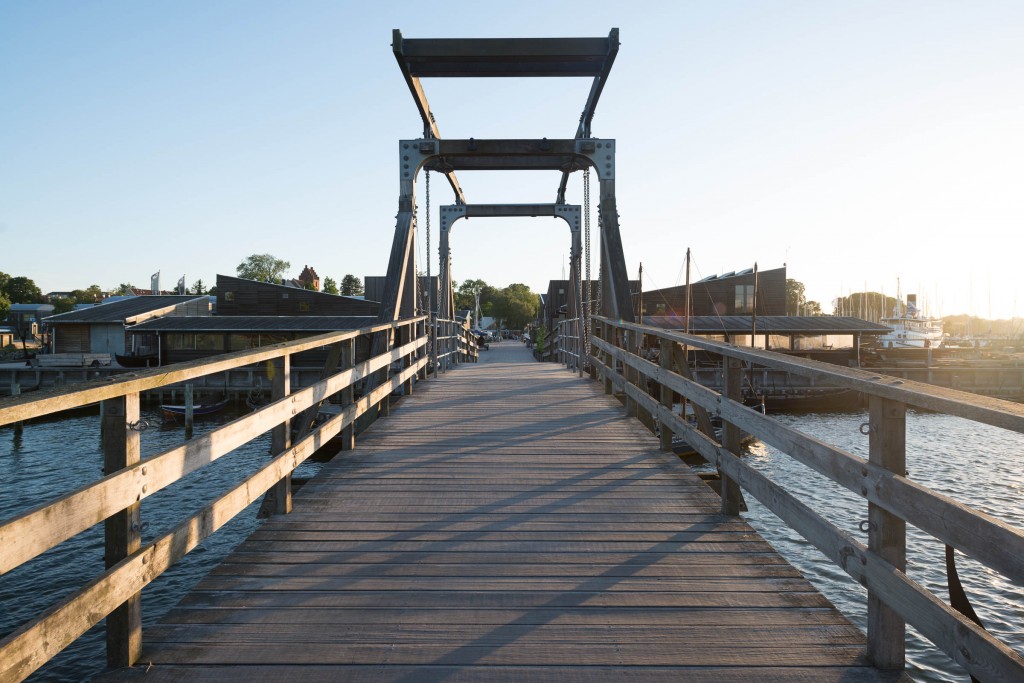
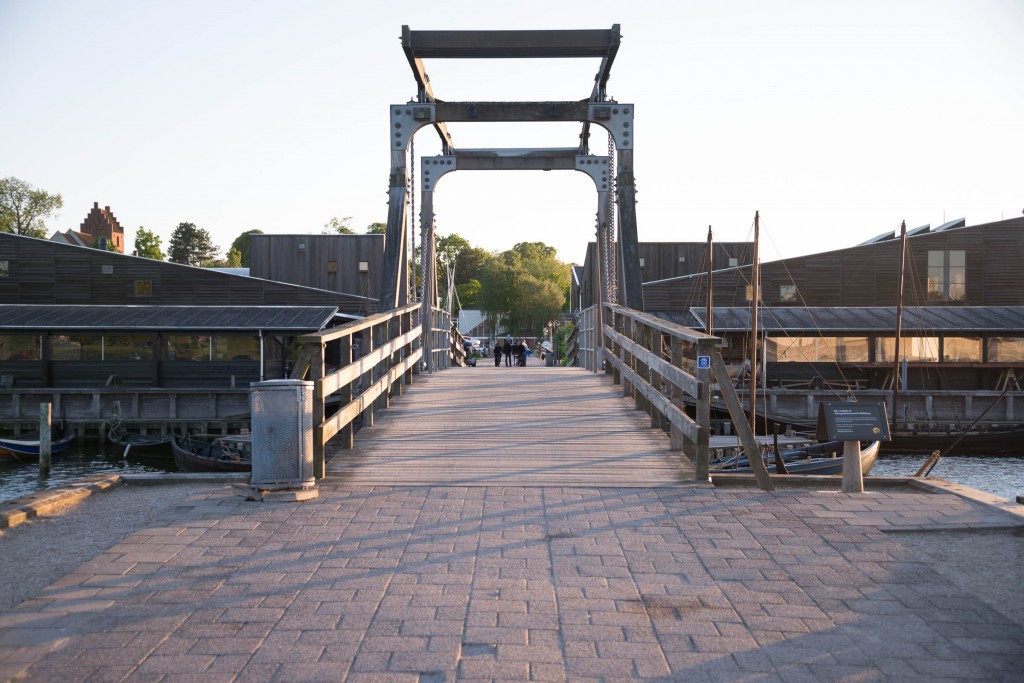
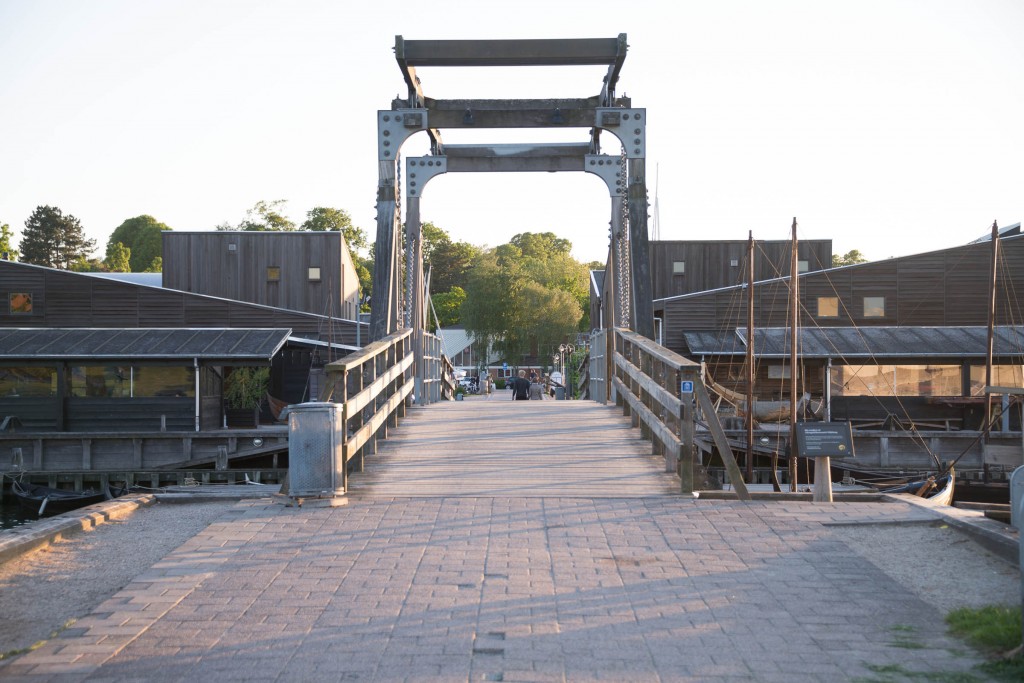
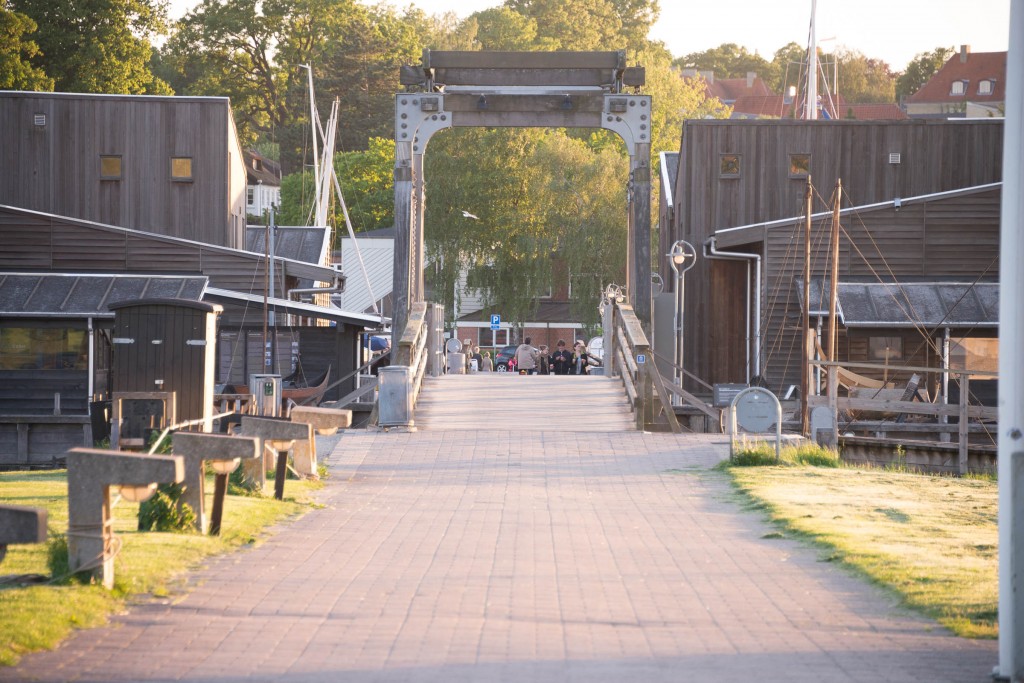
This calls for some examples to get the grip of it. I found a bridge here in my hometown, and then I shot this bridge as the primary object in my photo, and kept it approximately the same size, and different focal lengths. This is something, that you can’t do with your own eyes, but your brain knows how to translate it.

I have tried keep the frame of the bridge in the same size, and started at 14mm, in which case I had to actually stand on the bridge, and then I moved backwards and took shots at 24mm, 50mm, 70mm,100mm, 200mm and 300mm. And that gives this sequence of photos:
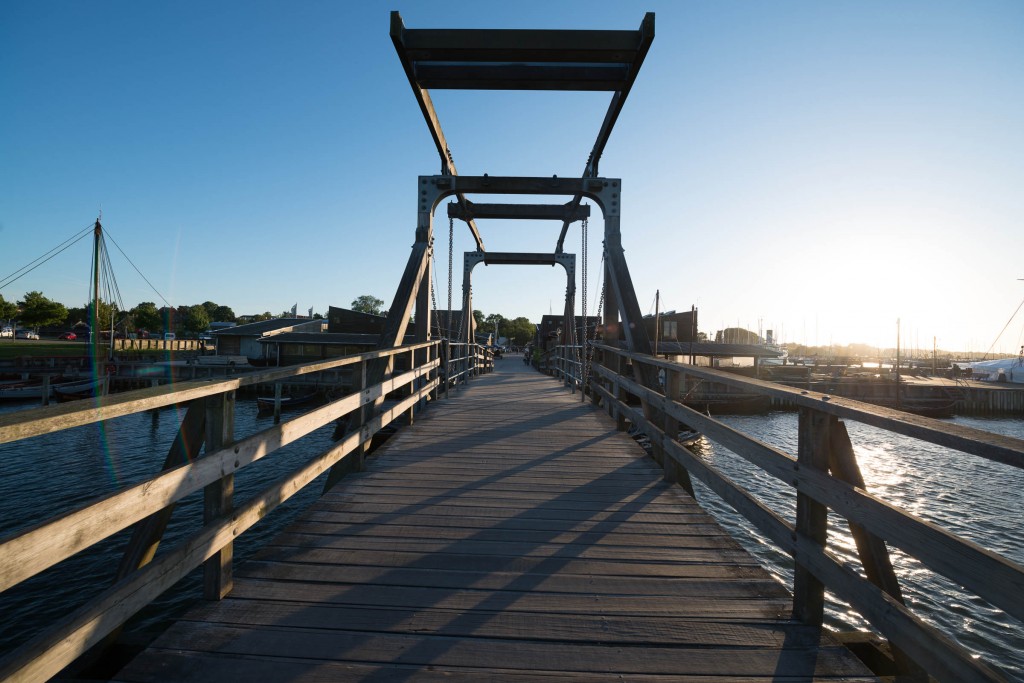
Lens compression 14mm moving14mm. Can you spot the tree in the center?
Lens compression 24mm moving24mm. You can see a small tree in the center now.
Lens compression 50mm moving50mm. Now the tree is clear, but still small. This is the way the human eye sees it.
Lens compression 70mm moving70mm. The tree grows.
Lens compression 100mm moving100mm. The tree now fills the inner frame of the bridge.
Lens compression 200mm moving200mm. The tree has grown out of the inner frame of the bridge.
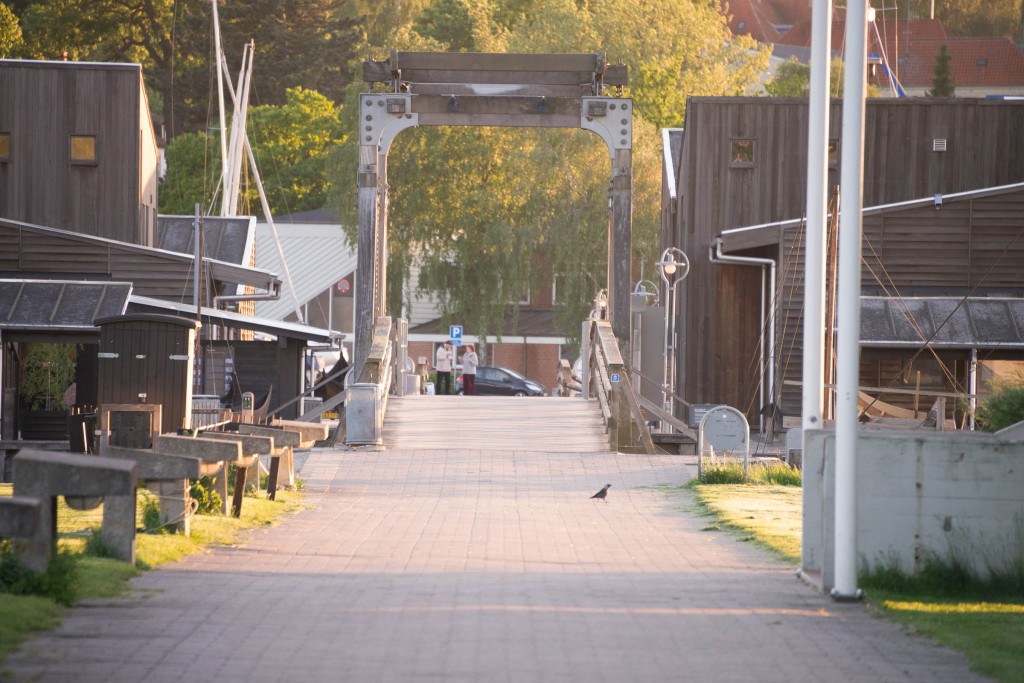
Lens compression 300mm moving300mm. Now you can’t even see the horizon.
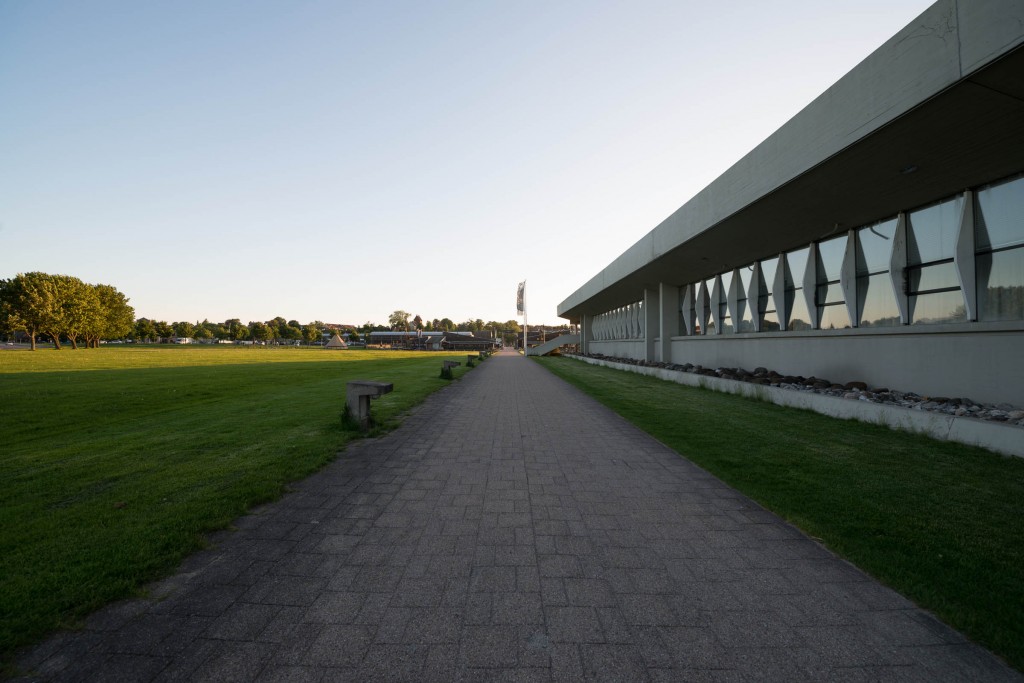
Lens compression 14mm fixed location

And this final image is back to the 14mm, taken from where I took the 300mm shot.

As you can see things change quite dramatically. As you get longer focal lenths, things that are further away suddenly seems closer. The tree in the back ground, suddenly grows big.

This you can use as a feature, when you compose your photo, either by pushing something further away or pulling something close. If you use a tele lens to shoot mountains, you can make them look bigger, than they really are.

Lens compression on cropped and full frame cameras

Let’s return to the cropped camera vs full frame camera issue and the crop factor. As you might be able to realize now, a crop factor of 1.5, does not make a 10mm lens on an APS-C camera equivalent to a 15mm lens on a full frame camera.

Depth of field on cropped vs full frame cameras

Another thing, that comes from the optics, is that wide angle lenses have a huge depth of field, meaning that you can have almost everything in focus, while tele lenses are good to make blurry back grounds on portraits. If you are shooting landscape photos using extreme wide angle lenses, you will be able to get even more in focus on a 10mm lens compared with a 15mm lens. This can be an advantage. So a cropped camera will in general have a larger depth of field, than a full frame camere, if you use the crop factor to recalculate the focal length. But this also has got one more implication, which involves the bokeh.

Bokeh on cropped vs full frame cameras

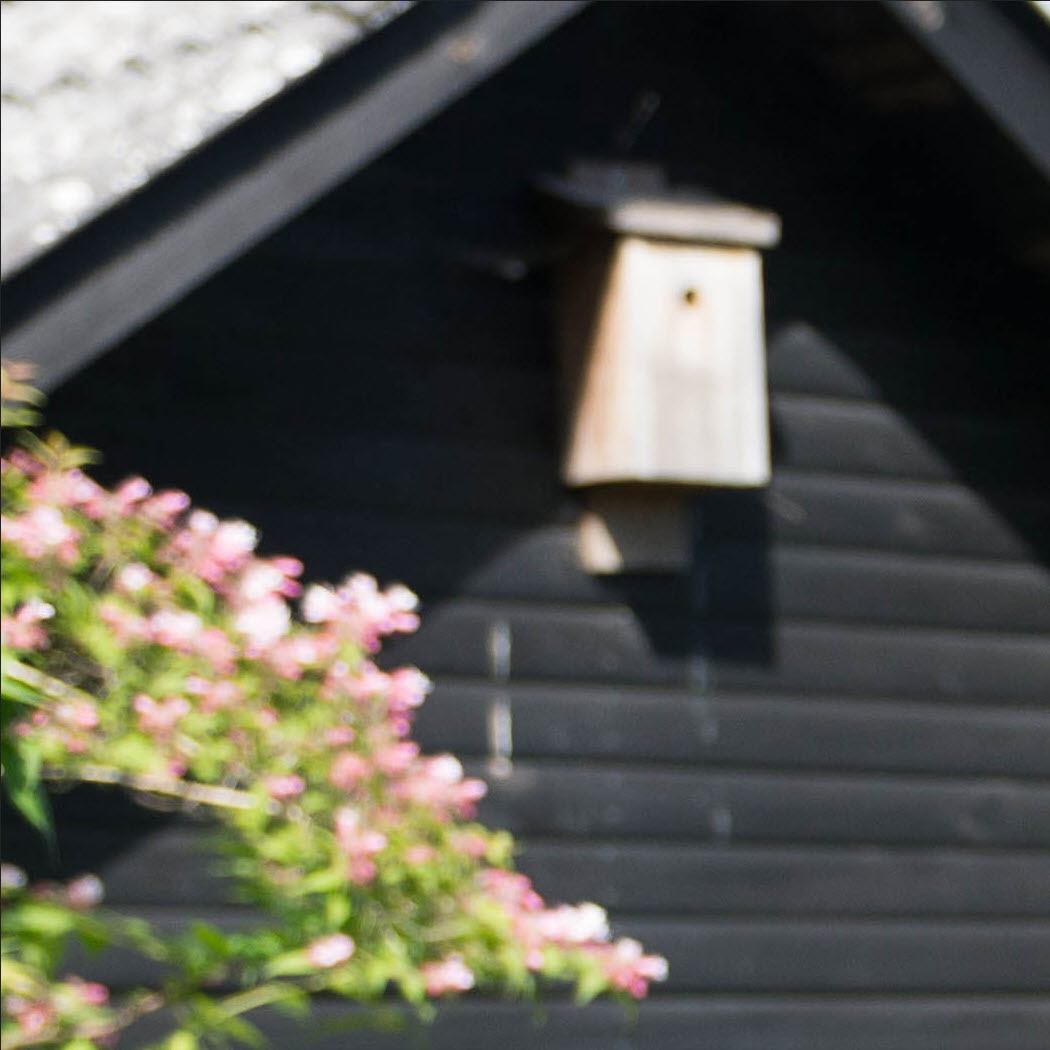
Because the depth of field is larger on a cropped camera, if you use the crop factor calculation on the focal length (like 30mm on a cropped camera equals 45mm on a full frame camera), the bokeh also changes. The bokeh is the “out of focus” blurry back ground that looks to great on portraits. Let’s have a look at a 100% crop of both images at the same resolution.
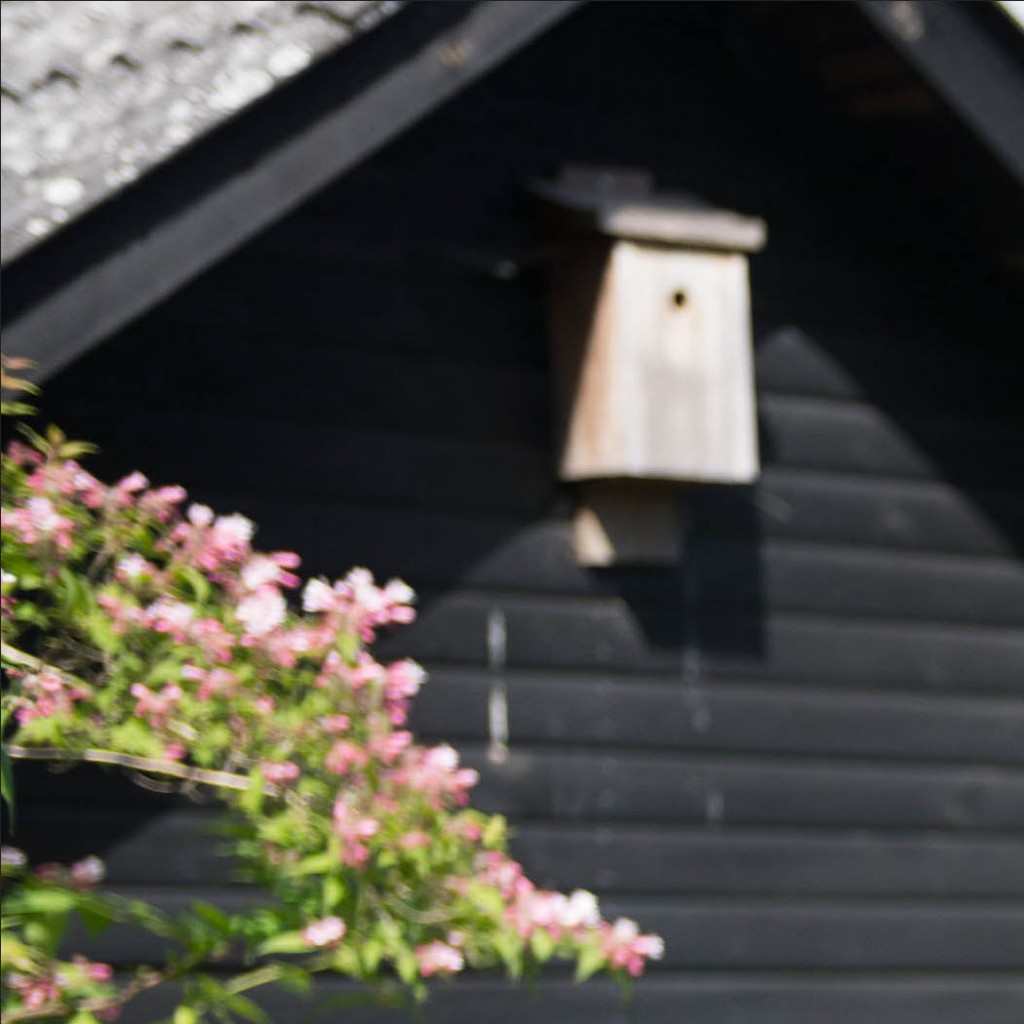
DX bokeh100% crop of a 30mm, f/2.8 on a cropped camera. Notice the bokeh on the flowers.
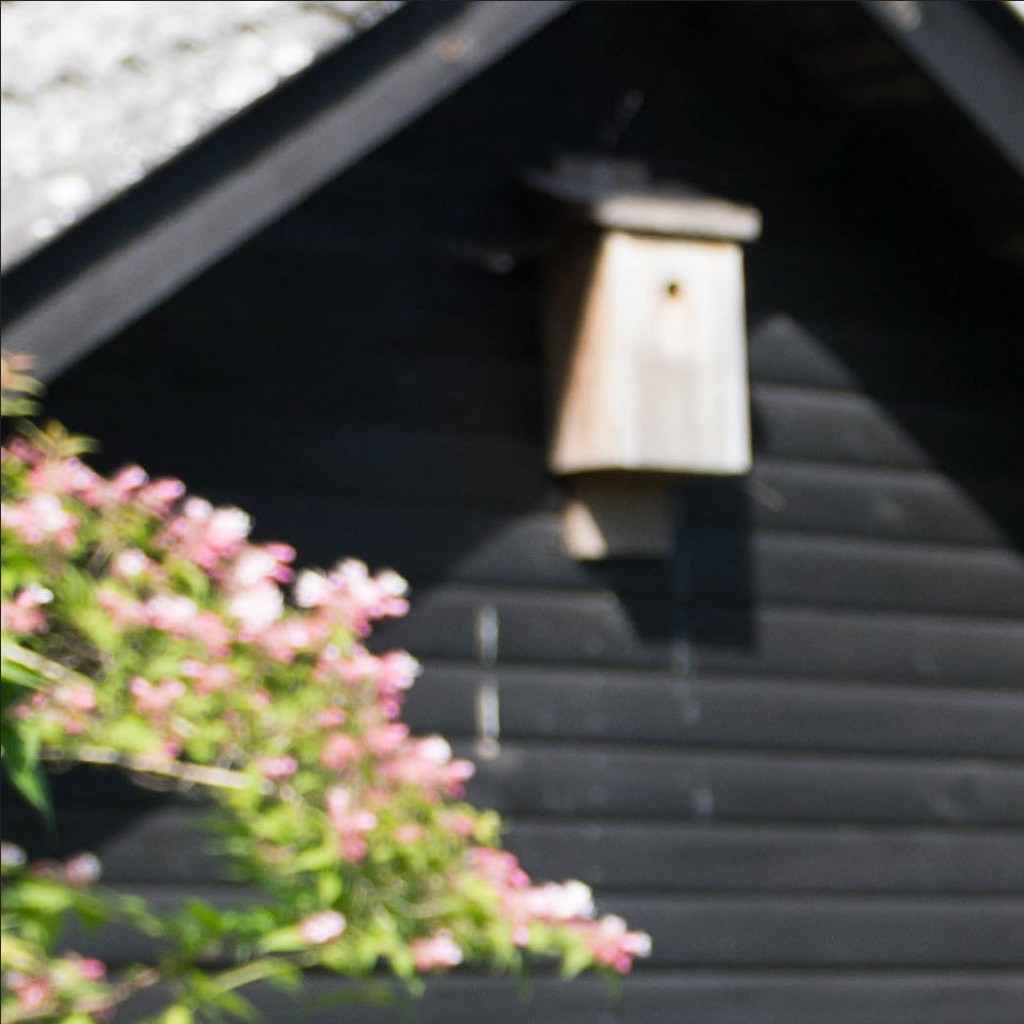
FX bokeh

100% crop of 45mm, f/2.8 on a full frame camera. Notice much softer and stronger bokeh.

As you can see you get a much softer and nicer bokeh on the full frame camera, which is an advantage if you are shooting photos, where you need the bokeh.