Clean up the ground – it does make a difference!


Warning: Undefined array key "multiauthor" in /var/www/caughtinpixels.com/public_html/wp-content/plugins/post-layout/plugin.php on line 114

Warning: Undefined array key "mobile" in /var/www/caughtinpixels.com/public_html/wp-content/plugins/post-layout/plugin.php on line 352

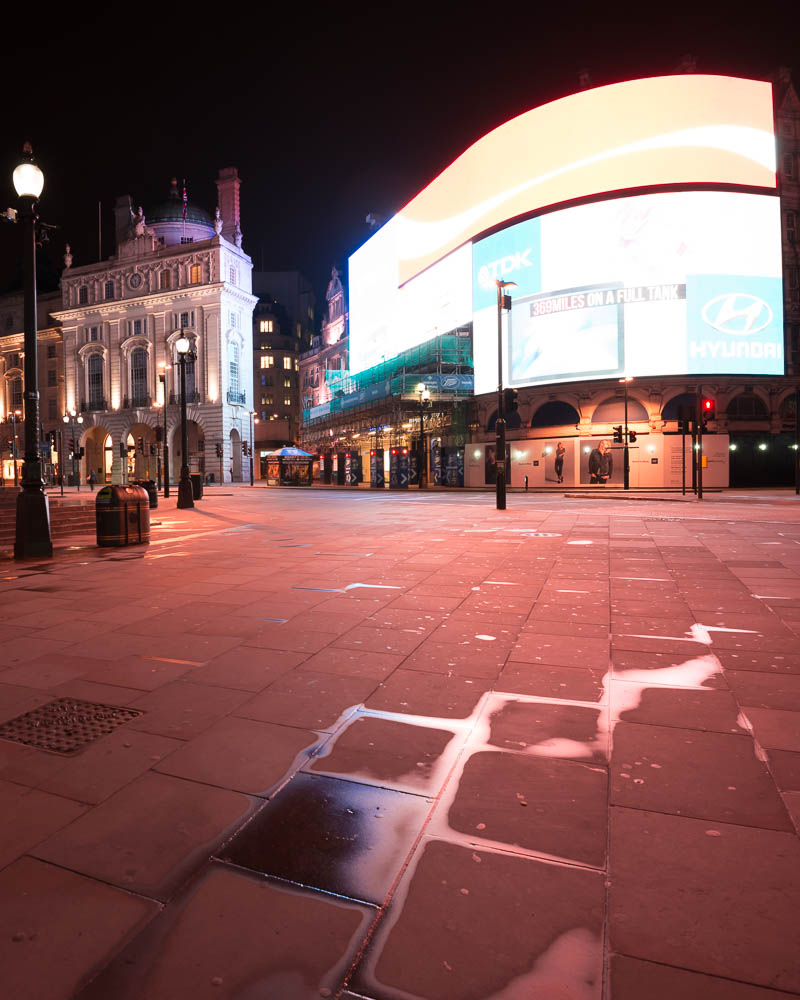
I never thought that I should see Piccadilly Circus abandoned for people, but at 5:43 in the morning it is possible. A single early bus passed while I shot the photo. Photo by: Jacob Surland, www.caughtinpixels.com
I have a few shots from Piccadilly Circus, and for some reason, all of the chewing gum in the world is spat out here. Have a look at the before photo, and see how much chewing gum there is on the ground. I have spent hours and hours cleaning up the ground using healing and cloning tools in Photoshop.

It’s a drag to clean up that much chewing gum, but it is worth the hard work. The result looks so much better, and it does make the difference.

This is the before photo, or rather one of the 9 photos – actually 18, because I shot two series of 9. The first series were completely empty and the second included the bus.

Chewing gum on Piccadilly Circus

How to make textures to save a gray photo


Warning: Undefined array key "multiauthor" in /var/www/caughtinpixels.com/public_html/wp-content/plugins/post-layout/plugin.php on line 114

Warning: Undefined array key "mobile" in /var/www/caughtinpixels.com/public_html/wp-content/plugins/post-layout/plugin.php on line 352

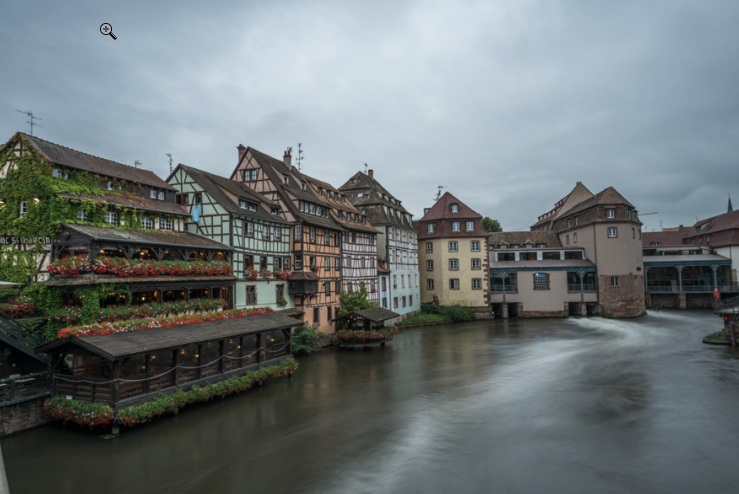
Strasbourg city of administration and city of beauty. Known for it's EU administration. But Strasbourg is much more than administration, the old center of Strasbourg has a long and very interesting history. One of the pearls is the Pont Saint-Martin. There's lock between the lower and the higher canals. You can sail the canals, and walk the narrow old streets. Photo by: Jacob Surland, www.caughtinpixels.com Once in a while, you just don’t have either the time of day or the weather with you, when you shoot photos. Take this example from Strasbourg. I had researched Strasbourg from home, and had a pretty good idea, what I wanted to shoot. But two things turned out to be a problem. 1) I could not stay in the city until sunset, due to time schedules, but I could stay until an hour before sunset, which could have been good enough. 2) It was grey, and there was drizzle. I shot my shots using an umbrella, and left Strasbourg not quite satisfied with the result. It’s a long exposure, to at least try to make the water interesting enough. I love this place Pont Saint-Martin in Strasbourg. I think it is also probably the most photographed place in Strasbourg, nevertheless I love the place, and I did not want to let my photo go. I looked into alternative processing methods. I did not have any success on the light, so I had to add something else, make it stand out. And as it turned out, it was in using textures I found the answer. This is the before photo: Pont Saint Martin before And this is what I did: Continue reading

Gotta get my Mojo working!


Warning: Undefined array key "multiauthor" in /var/www/caughtinpixels.com/public_html/wp-content/plugins/post-layout/plugin.php on line 114

Warning: Undefined array key "mobile" in /var/www/caughtinpixels.com/public_html/wp-content/plugins/post-layout/plugin.php on line 352

The city of Luxemburg is placed in and above a canyon. Along the edge of the canyon a balcony runs giving you a fantastic view of the beautiful old city below. It's nick named the most beautiful balcony in Europe. Luxemburg is both modern and an old city, with a grand history of war, money and politics. And there are many great restaurants for food lovers like me. Absolutely worth a visit. Photo by: Jacob Surland, www.caughtinpixels.com


I am a realist by Nature. Sometimes that is a curse and at other times it’s a blessing.

Currently I am trying to push new styles out of my photos, but it doesn’t really work for me, yet. Life has taught me, that everything is hard the first time you try. Experience comes in … well levels. You get stuck from time to time, but suddenly you can do whatever you were trying to do. A new skill has been acquired (tada.wav). Sometimes you don’t even realize, what was difficult is in fact no longer difficult.

Then for a while you get comfortable with what you are doing – your mojo is working just great. But then you start trying to reach new areas. Things get hard, and you have to get mojo working again.

Currently I find myself in such a place. I don’t full fill my own expectations to myself to the level I want to be on. I don’t get exactly the results that I want. I am searching for the answer, searching for the key that will unlock the door I want to go through. I am confident that I will find the key, not sure when, though. But eventually I will succeed. This life has taught me.

One of the things I have been dealing with is colors. The danger over over saturating photos, while not leaving them flat and colorless. I am addicted to the colors, and the more I use them, the more I want them, and suddenly, I am over the edge. This photo I have processed over the last couple of days, with the specific goal to keep saturation well under control.

This is a an in between version:

Luxemburg before

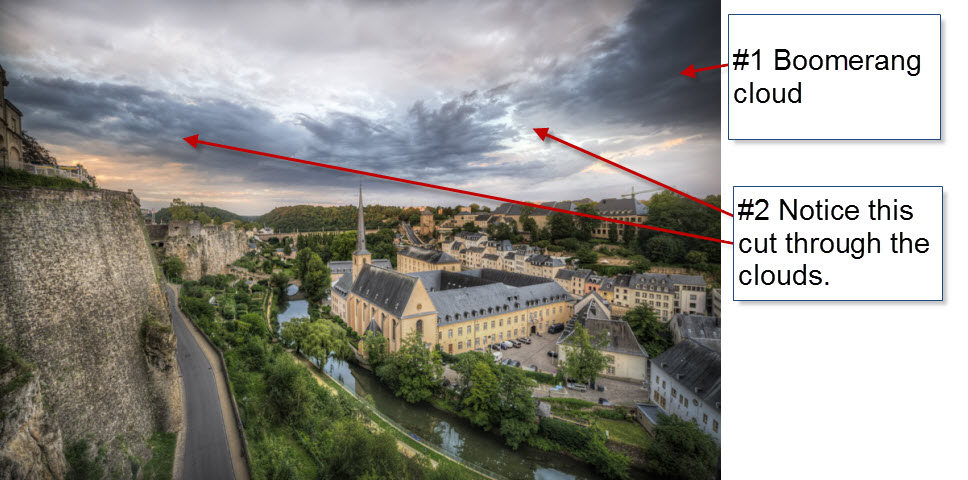
#1: The original had this boomerang cloud, slightly darker than the rest of the clouds. I enhanced it to get an “object” in the sky, to work with the ground. But I wasn’t really happy with it, until I noticed that there were some natural edges or cuts in the clouds.

#2 I used this natural cuts, to brighten up the sides of the boomerang cloud and ended up with a cloud like an object in the sky. This worked much better with the composition, I think.

About the photo

The city of Luxembourg is placed in and above a canyon. Along the edge of the canyon runs a balcony giving you a fantastic view of the beautiful old city below. It’s nick named the most beautiful balcony in Europe. Luxembourg is both modern and an old city, with a grand history of war, money and politics. And there are many great restaurants for food lovers like me. Absolutely worth a visit.

Understanding HDR part IV – HDR and Tone mapping


Warning: Undefined array key "multiauthor" in /var/www/caughtinpixels.com/public_html/wp-content/plugins/post-layout/plugin.php on line 114

Warning: Undefined array key "mobile" in /var/www/caughtinpixels.com/public_html/wp-content/plugins/post-layout/plugin.php on line 352

Amsterdam Maritime History Museum looks beautiful in the early morning. The building reflects in almost perfectly smooth water. Behind me, the city is beginning to come alive. Photo by: Jacob Surland, www.caughtinpixels.com

This is the fourth article in my series of articles on getting a better and deeper understanding of HDR photography.

If you haven’t read the previous articles, you might find them interesting too before reading this one.

High Dynamic Range and Tone Mapping

Is HDR the same as tone mapping and vice versa? No, it is not. However, it is two terms that people often confuse with each other, and it is quite important to get a grasp on which is which, if you ask me.

In Part II about the Dynamic Range I said that a High Dynamic Range photo, is a photo that is merged from several different exposures into one final photo. This way you extend the cameras natural dynamic range and get more detail.

People with some knowledge of photography, will often recognize an HDR photo, as being an HDR photo. But what they recognize is really something different, than the fact it is an HDR photo, if by HDR, we stick to, that it is several photos merged into one.

Continue reading

Understanding HDR part III – The Histograms


Warning: Undefined array key "multiauthor" in /var/www/caughtinpixels.com/public_html/wp-content/plugins/post-layout/plugin.php on line 114

Warning: Undefined array key "mobile" in /var/www/caughtinpixels.com/public_html/wp-content/plugins/post-layout/plugin.php on line 352

Piccadilly is always crowded - well almost always. And shooting photos there is difficult because of all of the people. But when you patiently are waiting, with your camera on tripod, people also get curious and come talking to you. This particular image is assembled from 9 various photos, with different people and light settings. Photo by: Jacob Surland, www.caughtinpixels.com

May the Histograms be with you!

Use the Histograms, Luke!

In this article I will cover histograms. I will use the knowledge from part I and part II of this series of articles on Understand HDR. If you missed the first two, you might want to read them too.

Some of the questions I will try to answer in this article, are ‘What is a histogram?’, ‘Why are histograms important in HDR photography?’ While answering there will be other findings; findings like: ‘Why is it important to push the histogram to the right?’

When I started on digital photography I noticed the histograms on my camera, when I played back my photos on the LCD screen. I did not really realize what, it was. I guessed it was some kind of graphical representation of the photo, which is true, but the real understanding I did not realize until much later.

Last year I attended a photo workshop, and the coach managed in a few hours, to explain to everybody, even the wives of the photo geeks, what a histogram is, how important it is and how to use it in a field. I was quite impressed by this deed.

Histograms are one of the most important tools for a digital photographer. It is always important, also if you are shooting HDR photos, some think it might not be, but it is. I still sometimes forget to check my histograms and I regret it when I get home.

What is a histogram and what does it show?

A histogram is a visual representation of how the tonal range is in a photo. The height of the bars in histogram, tells us how many pixels in the image have the specific tones.

The far left of the histogram is black and the far right is white. If there is a lot of high bars in the left hand side of the histogram, the image will have a lot of dark tones, while if there is a lot of high bars to the right, the image will have a lot of bright tones.

This photo is a well exposed photo:

Histogram - bell curve

A photo like this, is a well a exposed photo because the bars does not touch either side of the histogram. But it tells us more than that. From the distribution of the height of the bars, we can see that there is a peak in bright tones end of the histogram, which tells us a lot of brightness exists. And of course that is the bright clouds.

Continue reading

5 easy steps to improve your HDR photography


Warning: Undefined array key "multiauthor" in /var/www/caughtinpixels.com/public_html/wp-content/plugins/post-layout/plugin.php on line 114

Warning: Undefined array key "mobile" in /var/www/caughtinpixels.com/public_html/wp-content/plugins/post-layout/plugin.php on line 352

Monaco is a beautiful little country. At the center you find the old Casino Monte Carlo. Rich people come and park their cool cars and people gather to envy the cars and take pictures of them. Photo by: Jacob Surland, www.caughtinpixels.com

I often hear someone saying about my photos “Usually I do not like HDR photos, but I this one I like. You have not overdone it.” This kind of comment of course makes me happy; who doesn’t like to get appraisal of ones work? But I also think to myself “You should know how much I have treated this photo – this is HDR extreme!“.

I have heard it so many times, that I have started thinking about, what it is that people “who don’t like HDR’s” don’t like. Because, clearly, it is not the HDR they don’t like. It must be something else.

I believe that one of the things they don’t like, is when the HDR photos are badly processed. If you want to make great HDR’s, there are some rules, you have to oboy, no-matter if you are doing extreme HDR’s or more natural looking HDR’s.

Save 15% on Photomatix Pro. Remember that by using the coupon code “caughtinpixels” you will get 15% discount on Photomatix Pro here. Photomatix is the HDR tool in the world.

Tip #1 Do not have halos in your HDR’s

Halos tells that you are not very good at processing your photos – or at least sloppy about it. Halos can in some cases be really really difficult to fix. But in most cases I find it easy, to moderate easy. The problem usually comes, when you start boosting your effects.
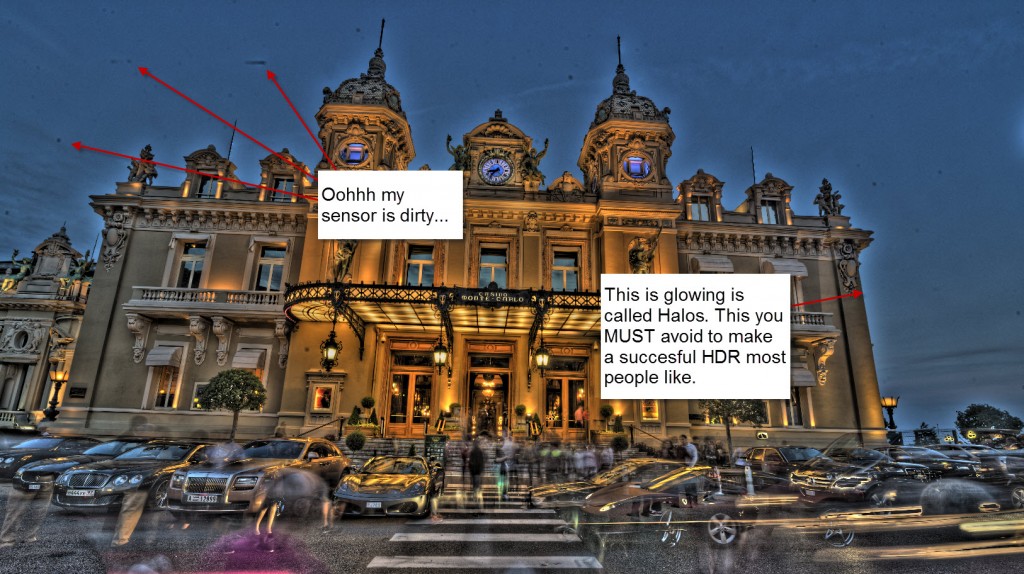
Monaco halosLearn to control your boosting of effects. Do not apply the strongest effect you possible can. Do go either one step at a time or do it more moderately. It is not a competition of going most extreme. It is all about making an awesome photo. This is NOT awesome.

You can do almost anything with your HDR, go lightly, extreme etc. Just do not have halos!

Check out my HDR tutorial to see how to remove halos. And here you will also see how to use effects selectively. One of the most important rules, is that you don’t have to use an effect globally in your photo. If the effect only improves 10%, of the photo, by all means, only use it in 10% of the photo and throw away the rest.

Tip #2 Be there at the right time

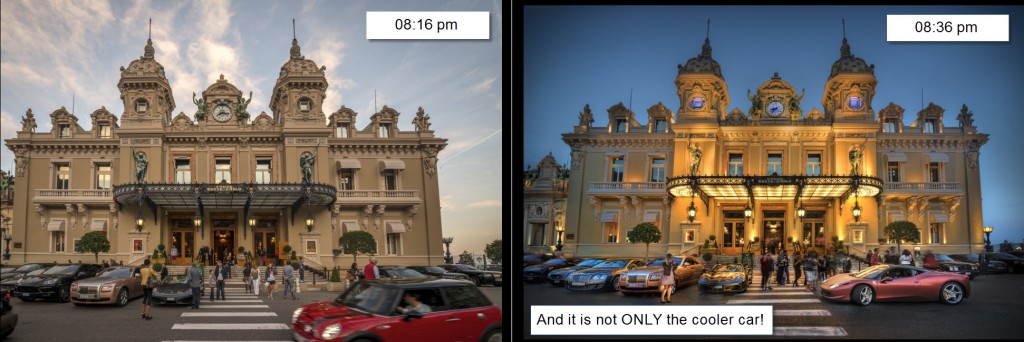
I am not a great fan of daylight HDR’s. Yes, often you do have a very high dynamic range in the middle of the day, and you can only cover it using HDR technology, but you usually do not get the coolest photos. Yes, you can usually hand held the camera, because there is much more light, and therefore the shutter speeds will be much faster, but it shows in the final result.

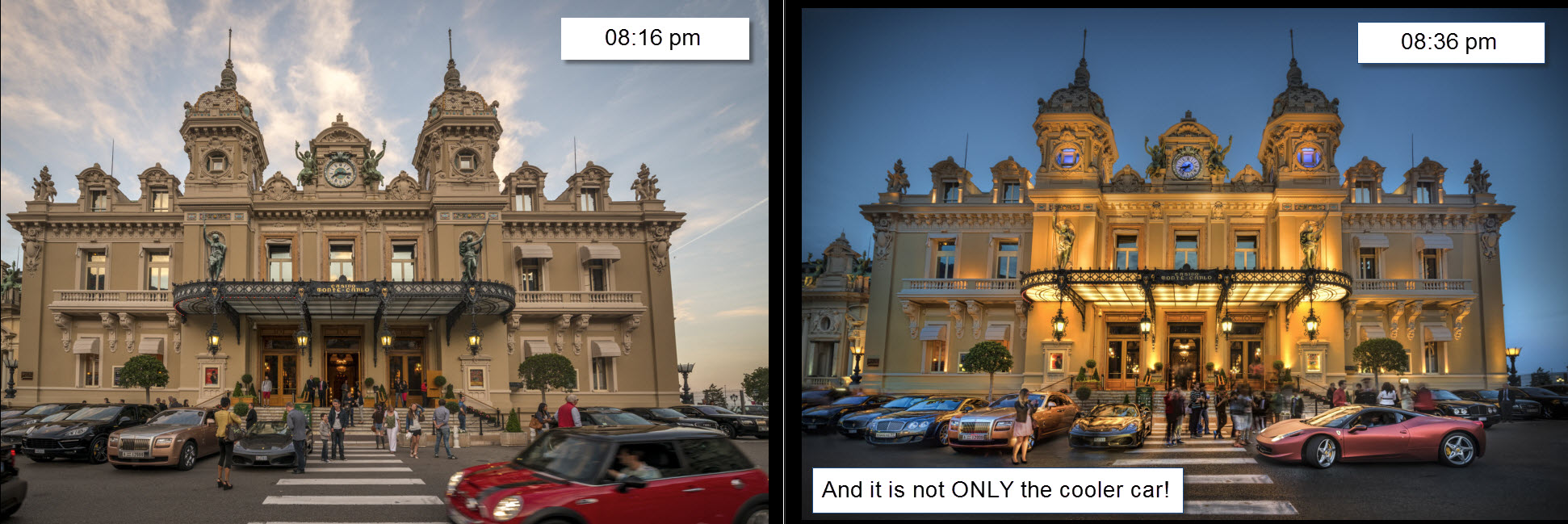
This is 20 minutes difference. Do you agree, it was worth waiting for those 20 minutes? And it is not only the much cooler car, that does the trick. It is the light.
Monaco - timing

The timing goes for all photography really, but HDRs kick in the turbo, when it get’s low light.

Tip #3 Use a tripod

If you already have learned to accept tip #2, then do not be tempted to shoot with out a tripod. If you do not use a tripod, you will have to compensate in other ways. First you will open your lens to the lowest f number and will end up at f/2.8 or f/3.5 or whatever your lens supports. Second, you will get longer exposure times, and when they get so slow, you can’t keep the camera still, you will increase the ISO.

A nasty side effect of making HDR’s, is the noise. It kind of comes with the concept, because details are enhanced. Some HDR products are better at handling the noise than others. And you can do a lot with noise reduction, but still… You loose quality and details.

The only way around it, is to use a tripod and have those longer exposure times, too keep the ISO as low as possible.

It took some convincing for me to use the tripod … always! And I felt stupid the first times I used the tripod among people, but I have learned, that you gain respect. And whenever you put up the tripod, people stop up, and take the “same” photo using their cell phones.

Tip #4 Setup the camera right

Setting the ISO

Fix your ISO to as low a setting as possible – do not use auto ISO! You will get far too much noise in the bright exposures.

It is a compromise, when it get’s darker, you will have to increase the ISO, to stay within the 30 second exposure, for the longest exposure. If you need to have a longer exposure than 30 seconds, you can either increase the ISO or the aperture (a lower aperture number). This is a compromise.

Use aperture mode

Always use fixed aperture mode (A or Av depending on the brand) when you shoot your bracketed shots. You can also do this in manual mode, but I only use manual mode in extreme cases. If you using aperture mode, you will be just fine in 99.9% of all cases.

But why not use Shutter speed (S or Tv) mode? Because what the camera will do, is to change the aperture for each photo. And changing the aperture changes the depth of field. And if the depth of field changes, you will end up with photos, that are not identical.

A scenario you could end up with, is that the dark -2 exposure might be tack sharp, because it has the lowest aperture (highest number), and largest depth of field.

The normal 0 exposure will have slightly blurred background and the bright +2 exposure will have both blurred foreground and even more blurred background, because the brightest will have the lowest depth of field.

Three photos with changing Aperture you can not blend. They are not identical and the result will not be good.

Use a timer or remote control

Use a remote control, cable release or a timer to set off the bracketed series of photos. If you touch the camera, the photos might be shaken.

Tip #5 remember to check out your histogram.

If possible at all, make sure, that you have all light covered. The reason why you are shooting more exposures in the first place, is to cover all light, from the darkest shadow to the brightest light source. And if you miss out, when you are doing the bracketed serie, you are not much better off, than you were in the first place with only one photo.

Check your histogram on the cameras playback function and check that you have all light covered.
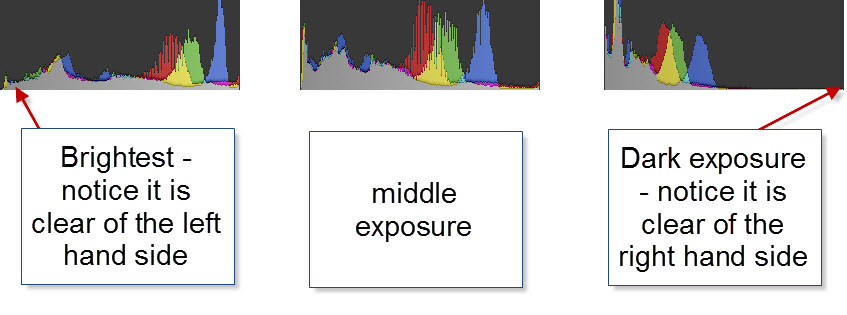
Monaco - histogramsSome situations are harder to cover than others, and might require more shots than others.

Some of the more difficult ones, are city night shots or shots having the Sun in the frame. Many of my city night shots, I often cover from -4 to +4 to get all information from the darkest shadows to the brightest light bulbs in the street lamps.

About the photo

I shot this photo in front of Monte Carlo Casino in a wild crowd of people with cameras. I only got four of my 5 planned shots, because a guard noticed my tripod. He was a senior member of the tripod police, and certainly did not like no tripods. I did not enter a discussion about, this being a public square, because I knew I had covered the light well enough, and got my cool car. I packed up my tripod and left the location happy.

Making the photo was really much more about mixing the four photos I had shot. The cool car is only present in the two of the four photos.

What I did, when I shot the serie, was a bit unusual, because of all of the crowd and the many cars passing by. I very carefully broke with my tip #4, and pressed shutter release manually for each exposure. Looking carefully at the scene for each photo. This way, I got my cool car, and made sure that I had photos with no people in more or less all parts.

Monaco beforeAs you can see, it was quite a challange because of all the people and cars.

Another problem was, that I had positioned the camera for the pedestrians crossing instead of the Casino. This was a bigger mistake than first anticipated. I ended up spending quite some time correcting the perspective. It wasn’t easy.

Removing the people required a very delicate mixing of the layers in Photoshop, and then some cloning too. But I ended up with a fairly clean photo.

When my photo was clean, I started to apply my effects on the lower half of the photo. The casino itself is HDR, but the rest is a handful of effects from various tools.

 

Sagafjord on a summer night


Warning: Undefined array key "multiauthor" in /var/www/caughtinpixels.com/public_html/wp-content/plugins/post-layout/plugin.php on line 114

Warning: Undefined array key "mobile" in /var/www/caughtinpixels.com/public_html/wp-content/plugins/post-layout/plugin.php on line 352

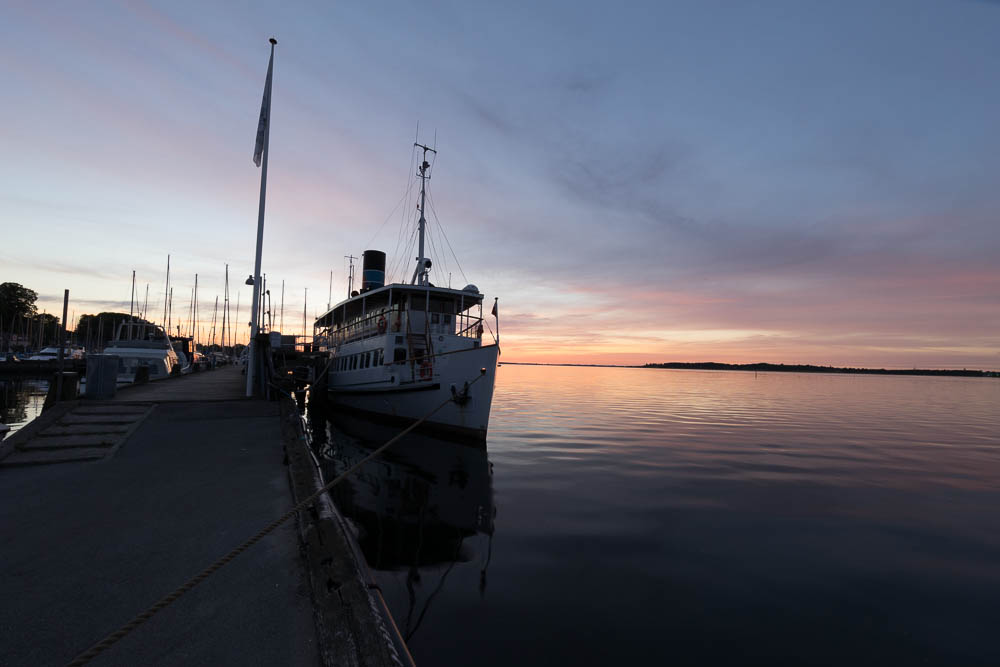
Sagafjord is a restaurant ship, that sails on Roskilde fiord. They serve both lunch and dinner, while the ship sails around in the fiord. Photo by: Jacob Surland, www.caughtinpixels.com

In my home town of Roskilde we have a restaurant ship, that sails the fiord of Roskilde. You can go for lunch or for dinner. It’s an old rebuilt ship and it really is a nice experience.

This photo is an HDR shot using my new Sony Alpha 7R and using the Sony 10-18mm lens. The lens is priced in the mid to lower end of the extreme wide angle lenses. It is only made for APS-C, but I can use it on the full frame Sony A7R. By default, it switches from 36 Megapixels to 15.4 megapixels, which corresponds to an APS-C sized sensor.

You can also use the lens as a full frame lens, however, not in the extreme ends, but if you stay between 14-16mm, you are ok. If you go to 12mm you have to crop a bit in the corners and the corners get too soft to my taste. Another and worse thing, using this lens as a full frame lens, is that the photos gets a really nasty mustage shaped distortion. Then I prefer to use it as a 15.4 megapixel lens instead.

The lens is a wonderful ‘light and small’ carry around lens. I do have a metabones adapter for my Nikon lenses, which will be my primary lenses still. Even on the Sony.

This photo is a 3 shot HDR. I shot it semi hand held. I had taken off the plate for the tripod, and forgotten about it. So I tried to stabilize the camera on top of the tripod, while eating an icecream too. But I managed – only because the camera and lens are so light.

This is the before photo:

Sagafjord before photo


Statue in Bruge


Warning: Undefined array key "multiauthor" in /var/www/caughtinpixels.com/public_html/wp-content/plugins/post-layout/plugin.php on line 114

Warning: Undefined array key "mobile" in /var/www/caughtinpixels.com/public_html/wp-content/plugins/post-layout/plugin.php on line 352

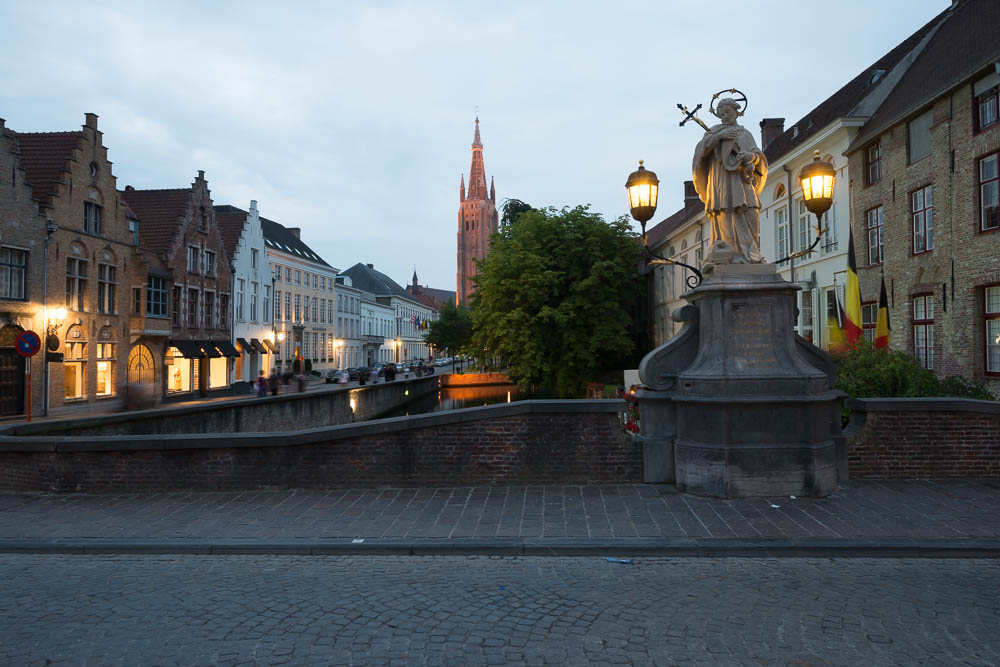
A Venice of the North, they call Bruge in Belgium, and not without reason. They have many canals and old houses. The Medieval center of the city is a truly wonderful place. This photo is from one the bridges crossing one of the canals. Photo by Jacob Surland, www.caughtinpixels.comThe town of Bruges in Belgium is a Venice of the North, and the Capital of Chocolate. This place is a place you definitely want to visit, if you ever get the chance! In the background you see the tower of the Church of our Lady. It is the second highest brick construction in the world and it rises a 122.3 meters from the ground. It is only second to Sct. Martins Church in Landshut, Germany.

Timing is crucial to achieve results like this photo above. Just when the city lights have been turned on, which they did 5 minutes before this photo was shot, you get the most wonderful mixture of natural light and electrical light. And you can achieve these very warm and inviting photos.

This photo belongs to my my Realism Digital Art series and I use both a single and a double tone mapped image, and I blend it with the seven original photos. I use Photomatix Pro to achieve this (you might want to read my free HDR tutorial).

This is a process that I love to do, painting all of these layers together into a final photo. You can really add mood and enhance lights and details to the extend you like.

This is the before photo:

2013-07-23-Sommerferie D600 2013-110


Is it a sin to crop a photo?


Warning: Undefined array key "multiauthor" in /var/www/caughtinpixels.com/public_html/wp-content/plugins/post-layout/plugin.php on line 114

Warning: Undefined array key "mobile" in /var/www/caughtinpixels.com/public_html/wp-content/plugins/post-layout/plugin.php on line 352

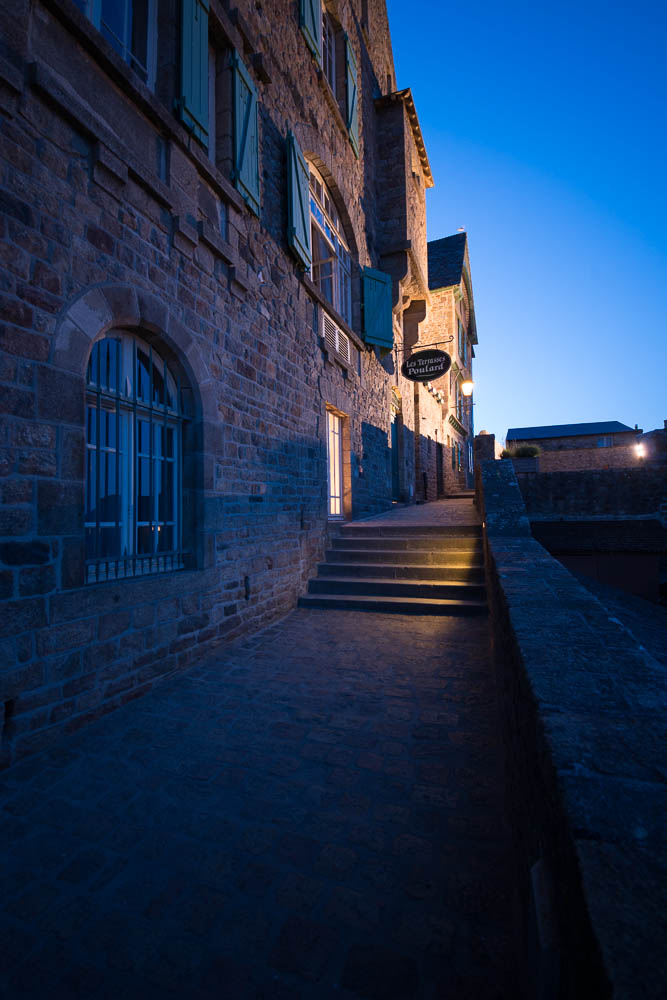
On a summer night in Mont Saint Michel you can find the quiet peaceful harmony. In the daytime tourists buzz around the medieval town. Photo by: Jacob Surland, www.caughtinpixels.com
Nikon D800, Sigma 12-24mm, 17mm, ISO 400, f/5.6, 0,5 sec (0-exposure)

This photo is from the famous Mont Saint Michel in France. It has a long, and in periods very violent history. According to legend, the Arch Angel Michael appeared to the bishop of the nearby town of Avranches. He was named St Aubert. The Arch Angel instructed the St. Aubert to build an oratory on the rock, just off the shores of Normandy. However, the bishop did not act on the instructions, and the Arch Angel got angry and burned a hole in the bishop’s skull.

The skull is on display in Saint-Gervais Basilica in Avranches. It is generally considered more likely, that the hole in the skull stems from trephination, an old medical treatment, that required drilling a hole in the skull, to treat certain diseases in the head. Whether it actually is St. Auberts skull is also unknown.

But St Aubert got the message, and had built an oratory in 709.

Is it a sin to crop a photo?

Many photographers consider it a bad practice to crop a photo. You should get it right in the camera! They say. But is that really the truth? And what’s the big deal?

Todaythe entry level DSLRs are up to 24 Megapixels. And I don’t think that you can even buy a new digital camera with much less than 12-16 megapixels.

I have an A1 poster in my living room, printed from a 10 megapixel camera. A1 is 23.39 × 33.11 inches. That’s a pretty big poster. If I go really close, I just MIGHT be able to tell the pixels. On a 3 feet distance, no way, that I can tell the pixels, even if I really tried.

For anything, that I am ever going to print, I think that 10 megapixels would probably be sufficient.

These days I carry cameras of 24 megapixels and 36 megapixels (Nikon D600 and D800). I could print photos from these cameras in enormous sizes, and even if you got up really close, you wouldn’t be able to tell the pixels. But do I really need this? There is a ‘masters of the universe’ power in having a 36 megapixel photo, but I don’t really get to use all these wonderful pixels, or do I?

I love to shoot with my wide-angle lenses. My darling, is my Nikkor 14-24mm, but often I do find 24mm to be just a little bit too wide. I do have a 16-35mm; I could attach that on my Nikon D600 and then switch camera, whenever I wanted just a little bit more than 24mm. But let’s do a little calculation.

I got more megapixels (36 all together) on my Nikon D800, while I “only” got 24 megapixels on my Nikon D600. If I crop a 24mm on a 36 megapixel camera, to 24 megapixels, then 24mm translates into 36 mm. In other words, I effectively can convert my 24 mm to a longer lens, by cropping.

If I could live with 10 megapixel, I would effectively convert my 24mm into a 86mm. That is quite a change!

On the other hand, I can’t convert into anything wider. What’s outside the border of 14mm I can’t capture. I often end up at 14mm, and I wouldn’t miss it for anything and I do not want to switch lenses all the time. In other words, I have to crop on the long end, if I can’t get exactly the length that I need.

I respect people who believe, that the photo should be right in the camera, but personally, I believe that as long, as you can get anything larger than 10 megapixels, you really are home safe. And if it is an improvement to the photo, do it!

Only if you in advance know, for a fact, that you want to print larger than A1, you need to be aware of the megapixels.

Can you use cropping constructively?

Another approach is to go just a little wider, than what you think is enough. I do this a lot, and I did it when I shot this photo. The thing is, if you go too tight and miss something, when you shoot, there is no way that you can ever get the rest. You would have to go back and reshoot.

If you, on the other hand, went just a little wider than you think is good enough, you can always crop it when you get back home.

This is the original of the photo:

Mont Saint Michel empty street - Original

As you can see, this is a wider cut of the image. The stairs are pretty much in the center of the photo. This is not too good, but I can change the composition by cropping, and push the stairs off-center. This way the stairs will be in one of the golden intersections (using the rule the Golden Ratio).

Mont Saint Michel empty street - crop


But that is not the only thing, that I can fix. I can make three of the leading lines start in the corners; this is a strong improvement on the composition too.

This I could probably have seen at location, but I worked really fast, and I really wanted many different shots from Mont Saint Michel, during the blue hour. By going just a little wider, I could postpone the decision to later, when I had more time and had time to shoot more photos.

In this case I still got a 24 megapixel photo out of the situation. That’s not bad! The Canon 5D Mark III is only 22 megapixels.


How to make a classic WWI plane enter a war scene


Warning: Undefined array key "multiauthor" in /var/www/caughtinpixels.com/public_html/wp-content/plugins/post-layout/plugin.php on line 114

Warning: Undefined array key "mobile" in /var/www/caughtinpixels.com/public_html/wp-content/plugins/post-layout/plugin.php on line 352

Sir Peter Jackson (Director of Lord of the RIngs) has his private collectoin of World War 1 aeroplanes stored at the Omaka Aviation Heritage Centre Blenheim. This is one of the first aeroplanes used in war, but you can also find the red baron among a lot of other great planes. What really is impressive, is the way each scene is built up. It's really amazingly detailed and very natural looking. If in the neighbourhood of Blenheim in New Zealand, don't miss out on the Aviation Centre. Photo by: Jacob Surland, www.caughtinpixels.com

This beautiful aeroplane  ‘Etrich Taube’ is one of the few left in the world. It’s the German’s first mass produced war plane and it dates back to before the Great Word (World War I). I saw this in Blenheim on the South Island of New Zealand.

Sir Peter Jackson (Director of Lord of the RIngs) has his private collectoin of World War I aero planes stored at the Omaka Aviation Heritage Centre Blenheim. This is one of the first aeroplanes used in war, but you can also find the red baron among a lot of other great planes. What really is impressive, is the way each scene is built up. It’s really amazingly detailed and very natural looking. If in the neighbourhood of Blenheim in New Zealand, don’t miss out on the Aviation Centre.

About the making of this photo

This photo is an 5 shot HDR. The plane hangs inside a hangar, and while some of the background is cool, the rest is looking like a hangar. As always, when making my photos, I run into trouble with something and have to find a solution to it. Let’s look at the original:

Before photo of Etrich Taube

As you can see, the scenery is quite nice, with two extra planes, and a war scene behind, however, the background isn’t large enough to cover the entire hangar.

I used a few tricks to make the plane look like in a real war scene. The first thing I did was to tone map my HDR photos, to get the look and feel of the aeroplane. This photo I then put into Photoshop and did a motion blur, in the direction of the plane seems to fly. And this I merged in all around the plane.

Etrich Taube explained


Having added the motion blur, around the plane, certainly helped removing most of the hangar, but the structure is still visible.

Etrich Taube explained blurred

The trick now is to make the rest of the hangar go away. And to do this, I start clone stamping some of the ground, at perhaps 25% opacity. The goal is to get all square lines out of the image or at least not noticeable. This proved difficult with only the ground available for clone stamping.

The original background contained some clouds and I decided to try to to a cloud texture on the photo, and then mix that in, in exactly the same way as I did with the blur. And now I had the material to start removing the hangar.

The important steps, was to remove what gave away, the fact, that the plane hangs inside a building.